
Purpose
To explain the most common topics (i.e. Tips) you should be aware of when before, and immediately after, your first synchronizations into a non-production ServiceNow CMDB.
Top Tips in Summary
Important Suggestion
Take note of the two right-hand columns on the table below. The columns provide context (about each row/Tip) relative to the following:
-
Do you have existing CIs in your CMDB, and therefore expect CI Sync to find/match (correlate) to those existing CIs. This is important for avoiding or predicting and understanding why duplicate CIs might be created during early testing in Non-Prod.
-
Do you not have existing CIs in your CMDB, and therefore have no requirement for CI Sync to find/match (correlate) to existing CIs.
|
Tip # |
Tip |
Relevance for customers with existing CMDB CI data |
Relevance for customers with NO existing CMDB CI data |
|---|---|---|---|
|
Tip #1 |
Understand and assess the default destination tables (CI Classes) used by CI Sync |
Highly relevant |
Less relevant |
|
Tip #2 |
Be aware of the key attributes CI Sync uses to correlate (match) to existing CIs |
Highly relevant |
Less relevant |
|
Tip #3 |
Understand the default rules for how CI Sync handles Master Data in ServiceNow |
Not specifically relevant to the presence (or not) of existing CIs |
|
|
Tip #4 |
Get the right people together to perform some “left-and-right” comparisons |
Relevant |
Relevant |
|
Tip #5 |
Consider surfacing additional attributes and/or related lists in your ServiceNow CI forms |
Not specifically relevant to the presence (or not) of existing CIs |
|
|
Tip #6 |
Understand how to “clean up” synchronization data in your non-prod ServiceNow as you cycle through a testing cycle |
Not specifically relevant to the presence (or not) of existing CIs |
|
Tip #1 - Understand and assess the default destination tables (CI Classes) used by CI Sync
Understanding this topic will help you avoid duplicate CIs if you have existing CIs in your CMDB
What is this tip about?
This tip is about the CI Sync rules (or sometimes called “mappings”) that control the target tables (CI Classes) in the CMDB for each incoming type of asset/record.
Additional Information
These rules impact the way CI Sync does two important functions:
-
The rules drive the way CI Sync searches for existing CIs (i.e. which table/s CI Sync searches for existing CIs).
-
If CI Sync finds a matching CI in the default table/s, then CI Sync will update the existing CI.
-
If CI Sync does not find an matching CI in the default table/s, then CI Sync will create a new CI.
-
-
The rules drive which table CI Sync uses when inserting new CIs (i.e. which table new CIs are inserted to if CI Sync does not find an exiting one).
This topic is extremely important for customers with existing CIs in their CMDB. Why?
-
Because CI Sync will only search for existing CIs within the tables (CI Classes) configured within these CI Sync default mapping rules. If CI Sync doesn’t find a matching CI in the default table for a given type of asset, then CI Sync will create a new CI which could be a duplicate of a CI held in a different table/CI Class.
What else should you read?
Syncfish strongly recommend customers read the relevant CI Sync Default Mapping Rules Per Source System (i.e. read the mapping rules relevant to your situation) to understand the default tables/CI Classes use by CI Sync.
|
Source system |
Link to CI Sync Default Configuration Guide |
|---|---|
|
AWS |
|
|
Azure |
|
|
GCP |
|
|
InTune |
Rule 2 - Mapping of InTune Corporate and BYOD Asset Types to ServiceNow CMDB CI Classes |
|
Jamf |
Rule 2 - Mapping of Jamf Asset Types to ServiceNow CMDB CI Classes |
|
Lansweeper On-Prem |
Rule 3 - Mapping of Lansweeper On-Prem Asset Types to CMDB CI Classes |
|
Lansweeper Cloud |
Rule 3 - Mapping of Lansweeper Cloud Asset Types to CMDB CI Classes |
|
Microsoft 365 |
Rule 3 - Mapping of Microsoft 365 Resource Types to CMDB CI Classes |
|
MS Defender for Cloud Apps |
Rule 3 - Mapping of Defender for Cloud Apps Resource Types to ServiceNow CMDB CI Classes |
|
MS Defender for Endpoints |
Rule 2 - Mapping of Defender for Endpoint Asset Types to ServiceNow CMDB CI Classes |
|
Nutanix |
|
|
Workspace ONE |
Rule 2 - Mapping of Omnissa Workspace ONE Asset Types to ServiceNow CMDB CI Classes |
|
Solarwinds Orion |
Rule 3 - Mapping of SolarWinds Asset Types to CMDB CI Classes |
|
VMware vSphere |
What should I do if I’m still unsure about this topic?
If you are not clear on this topic, please contact Syncfish Support for assistance (particularly if you have existing CIs in your CMDB and expect CI Sync to find and match to existing CIs).
Tip #2 - Be aware of the key attributes CI Sync uses to correlate (match) to existing CIs
Understanding this topic will help you avoid duplicate CIs if you have existing CIs in your CMDB
What is this tip about?
This tip is about the CI Sync rules and attributes that CI Sync uses to find existing CIs in your CMDB.
Additional Information
CI Sync uses a sophisticated “correlation” engine to find existing CIs in your CMDB. These correlation rules have some important characteristics:
-
The correlation rules are developed for every single record type.
-
CI Sync has correlation rules for Computer records, Firewall records, Switches and so on.
-
In addition, CI Sync also has to match existing database records, installed software records, cloud related services/records, sub-component records (like memory modules, storage devices) and so on.
-
The CI Sync correlation engine has hundreds and hundreds of highly tuned correlation rules for every possible record type flowing through CI Sync.
-
-
There are multiple correlation rules for each record type.
-
CI Sync uses multiple rules for every record type.
-
Each rule can test a single attribute (e.g. the serial number) or the rules may test multiple attributes (i.e. check all of the MAC Addresses for all of the NICs on a single device).
-
-
The rules are tested in a hierarchical order.
-
Because each record type has multiple rules, CI Sync will try and match on the first rule. If the first rule doesn’t find a match, CI Sync tries the second rule (for that specific record type), and so on until all rules have been exhausted.
-
Once all rules have been tested (for a given record), if no match is found then CI Sync assumes it is performing a CI Insert rather than a CI Update operation.
-
What else should you read?
Syncfish don’t publish the full suite of correlation rules (there are simply too many to sensibly describe). However, as you would expect, there are so many different attributes that can be used for matching for the types of records processed by CI Sync.
If your CMDB has existing CIs, and you expect CI Sync to find and match to the existing CIs, then it’s important to have an understanding of the key attributes used by CI Sync when searching for CIs. Furthermore, it’s important you assess the quality of data (attributes) on your existing CIs. Without sufficient attribute data quality, CI Sync may not find existing CIs and can then create duplicates.
The most common attributes used by CI Sync are as follows:
-
Serial Numbers
-
MAC Address (on the primary NIC and subordinate NICs)
-
Host Names
-
FQDNs
What should I do if I’m still unsure about this topic?
If you are not clear on this topic, please contact Syncfish Support for assistance (particularly if you have existing CIs in your CMDB and expect CI Sync to find and match to existing CIs).
Tip #3 - Understand the default rules for how CI Sync handles Master Data in ServiceNow
What is this tip about?
This tip is about the CI Sync rules that control how CI Sync interacts with ServiceNow Master Data/Reference Data including choice list values and similar.
CI Sync has default rules that control whether CI Sync inserts, and even deletes, values in your ServiceNow Master Data/Reference Data and Choice List tables. The default rules can be overridden by individual customers using the CI Sync Web UI. Knowing how the default rules apply, and whether you should override or not is an important concept to ensure CI Sync is “playing nicely” with these important Master Data tables in ServiceNow.
Additional Information
ServiceNow stores Configuration Items (CIs) in the various database tables that make up the CMDB itself. However, ServiceNow consists of many (many) tables in addition to the actual CMDB.
You can recognise the CMDB tables when looking at the URL of a given record in ServiceNow. If the URL contains a path that includes “cmdb_ci_*”, then the record is indeed stored in the CMDB (i.e. the record is indeed a Configuration Item/CI).
ServiceNow uses seperate tables (i.e. separate to the CMDB tables) to store Master Data/Reference Data and values that appear in Choice Lists. Examples of these are for records such as:
-
The master list of manufactures (which is stored in the core_company table).
-
The master list of carriers (also stored in the core_company table).
-
The master list of models (which can be stored in either the cmdb_hardware_product_model or the cmdb_model table).
-
The master list of locations (which is stored in the cmn_location table).
-
The master list of Operating System values (which are stored in sys_choices, along with many other drop-down/choice lists in ServiceNow).
-
The master list of Users (which are stored in the sys_user table).
Almost every CI in the CMDB will therefore contain a reference to one or more of the above tables. If a CI contains a location value (i.e. if a CI has its location attribute populated) then in fact this is a reference between the CI itself (held in a cmdb_ci table) and the corresponding location record in the cmn_location table. The same applies to a CI with the Assigned_To value populated (it will be a reference to the sys_user table) and so on for manufactures, models etc.
What else should you read?
Syncfish publish comprehensive documentation about the default rules/behaviours related to Master Data (and similar) in ServiceNow. These rules apply to all source systems (i.e. are applied by CI Sync to Destination Connections in the CI Sync Web UI).
Manufacturer Master Data Rules
Rule 5a – Synchronization of Manufacturer, Carriers, and Vendors (including Null) on the Parent CI
Rule 5b – Synchronization of various Manufacturers on the Child Records of the CI
Rule 5c – Automatic Creation of new Manufacturer Master Data Records in ServiceNow
Rule 5d – Automatically Deletion of Manufacturer Master Data Records in ServiceNow
Model Master Data Rules
Rule 6a – Synchronization of Model on the Parent CI
Rule 6b – Synchronization of Disk Models on Child Records of the CI
Rule 6c – Which Model Record Master Data Table to use in ServiceNow
Rule 6d – Automatic Creation of new Model Master Data Records in ServiceNow
Rule 6e – Automatic Deletion of Model Master Data Records in ServiceNow
You should also read about the default rules for Assigned_To and Location handling. These rules are also source system specific (i.e. are also applied by CI Sync to Source Connections in the CI Sync Web UI).
Source System Sample of Assigned_To and Location Rules
-
For InTune: Rule 9 - Synchronization of Assigned to User attribute for InTune
-
For Lansweeper On-Prem: Rule 21 - Synchronization of a Lansweeper On-Prem User Oriented Attribute for Assigned_To in ServiceNow
-
For Lansweeper On-Prem: Rule 9 - Standard Asset Location Determination Rules for Lansweeper On-Prem
What should I do if I’m still unsure about this topic?
If you are not clear on this topic, please contact Syncfish Support for assistance.
Tip #4 - Get the right people together to perform some “left-and-right” comparisons
What is this tip about?
This tip is about how you compare/validate data in ServiceNow that’s been sync’d from a source system.
Additional Information
CI Sync reliably sync’s data (records and attributes) from a given source system to your CMDB based on the CI default configuration rules published by Syncfish. So in many ways you don’t need to overly validate the data is moving from system A to system B.
It is however a useful exercise to perform a degree of “left and right” comparison between some records in your source system (e.g. InTune, Lansweeper, etc) and your ServiceNow CMDB. In simple terms this usually just means having two SMEs on a joint call (with screen sharing) to perform some left and right comparisons of individual records in the two systems. For example, a joint call with your InTune and Lansweeper SME and your ServiceNow CMDB owner and/or ServiceNow Admin SME.
The other common validation is more specifically performed by your ServiceNow SME/s. For example, have the ServiceNow CMDB owner and/or ServiceNow Admin SME answer these questions:
-
Are the CIs being stored in the CMDB tables (i.e. CMDB Classes) we expect and we want?
-
Is CI Sync finding and updating existing CIs in the CMBD (ones that existed before CI Sync testing commenced)? That is, are no new duplicates being created because of existing CMDB data and the introduction of CI Sync.
-
Are CIs being populated as you expect with key reference data such as manufacturer, model, etc?
-
Do you want CI Sync to populate attributes such as Assigned_To and Location? If so, CI Sync doesn’t populate these by default (for good reason). If you need these attributes in ServiceNow you should read the related CI Sync documentation on these topics and/or engage Syncfish Support for assistance.
-
Is CI Sync interacting with your ServiceNow master data and reference data tables as you expect? This includes tables such as cmn_location, sys_user, core_company and sys_choice.
What else should you read?
The documentation referred to across all of the other tips on this page cover the above topics very well. A bit of reading of the Syncfish documentation, in particular the relevant Default Configuration Guides, can be highly valuable before you start sync’ing and immediately after. See this page tree here: Default Configuration Guides.
What should I do if I’m still unsure about this topic?
If you are not clear on this topic, please contact Syncfish Support for assistance.
Tip #5 - Consider surfacing additional attributes and/or related lists in your ServiceNow CI forms
What is this tip about?
This tip is about updating your ServiceNow CI forms (i.e. the ServiceNow UI) to surface the wealth of information delivered by CI Sync into ServiceNow.
Additional Information
CI Sync delivers a large number of attributes, related lists and relationships into your ServiceNow. Not all of the information delivered by CI Sync (from a given source system) is surfaced by default on ServiceNow UI forms.
Syncfish make two recommendations on this topic so customers can decide if updates to their CI UI forms will be helpful when users of ServiceNow start acting on the automated data provided by CI Sync from various source systems.
-
View the XML details of CIs in ServiceNow to see which attributes are being populated. That is, visit a single CI for each type of asset/record you are sync’ing from various source systems, select the “Show XML” option in ServiceNow and review which attributes contain values. If an attribute contains a value and is not being surfaced on the CMDB CI UI forms, consider adding the attribute so all users can view and use the extra data.
-
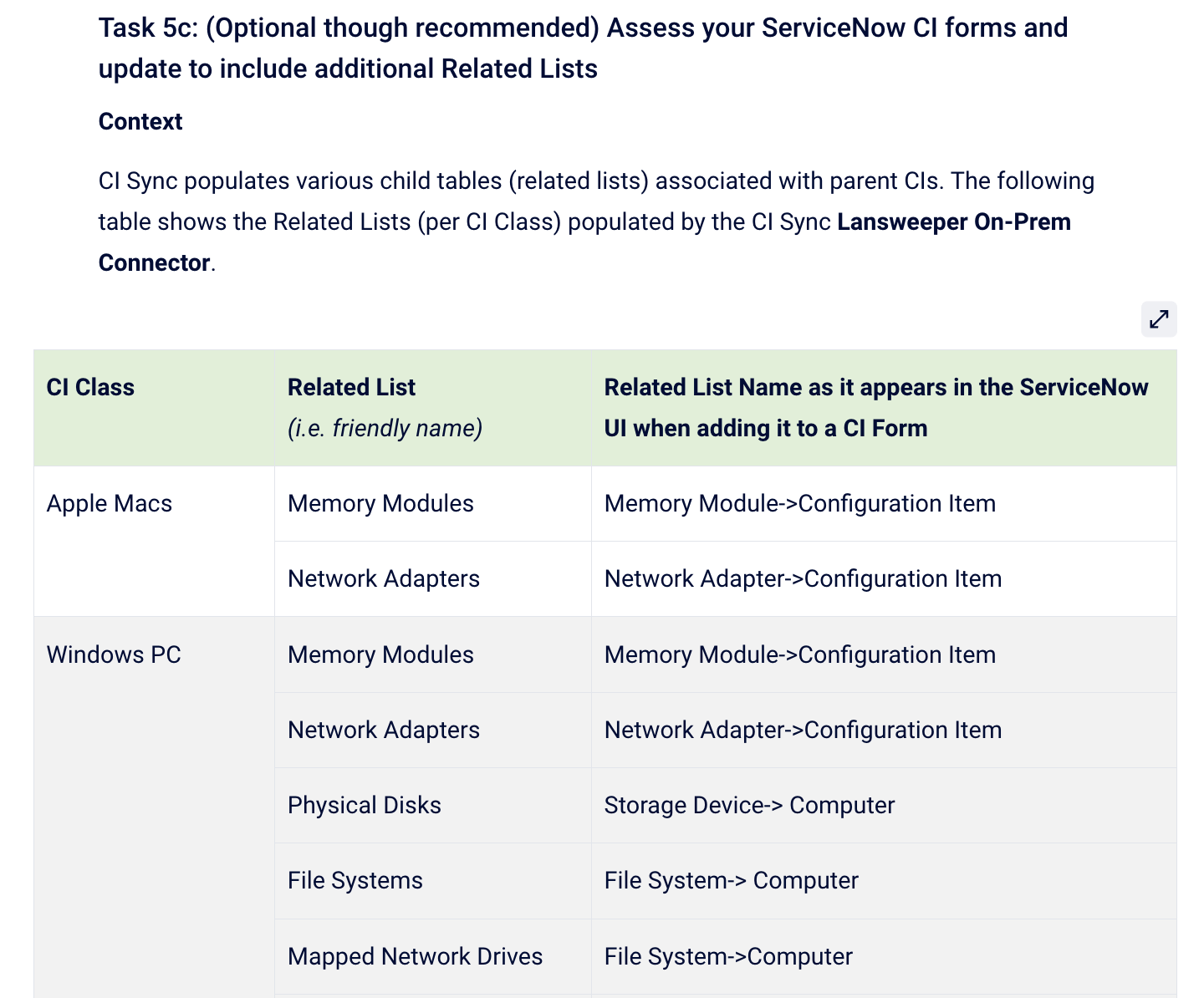
Consider adding additional Related Lists to your CI forms. Each CI Sync “Add [Source System] Connector” instruction page lists the Related Lists populated by CI Sync. You should read about the extra related lists and consider surfacing these on your CI forms in ServiceNow.
What else should you read?
-
Visit the CI Sync “Add Connector” instructions, relative to your source system.
-
Find the sub-section in those instructions called “(Optional though recommended) Assess your ServiceNow CI forms and update to include additional Related Lists” (the section is normally near the bottom of the instructions.
-
Update your ServiceNow CI UI forms using the guidance provided in the CI Sync setup instructions (see a snippet/sample for Lansweeper On-Prem via the screen shot below).
What should I do if I’m still unsure about this topic?
If you are not clear on this topic, please contact Syncfish Support for assistance.
Tip #6 - Understand how to “clean up” synchronization data in your non-prod ServiceNow as you cycle through a testing cycle
What is this tip about?
This tip is about how you can “clean up” data that’s been synchornized by CI Sync during a repeating test cycle in your non-production ServiceNow.
Additional Information
When you perform testing in a non-production ServiceNow, you might (but not always) need to “clean up” some of the synchronized data so you can perform repeated testing using your pre-sync’d/clean state. This might include:
-
Deleting CIs and/or master data (and related) records inserted by CI Sync during testing.
-
Reverting CIs updated by CI Sync back to their pre-updated state.
Keep in mind you don’t always need to revert the data for repeated sync testing. If you are simply running more and more sync jobs to include additional records, or update more/different attributes, then there may be no need to “clean up” prior sync’d data. It’s a little bit case-by-case whether you need to be cleaning up the destination data to prove the sync’d data is behaving as you need/expect.
Syncfish provide two main recommendations about this topic:
-
If you need to entirely revert a non-production ServiceNow back to a pre-sync/pre CI Sync state (including all inserts and all updates), then the best solution is a to clone another ServiceNow instance over the top of the one you are using for sync testing.
-
However, if you only need/want to delete newly inserted records created by CI Sync, then CI Sync offer a Fix Script for this purpose (see below for more info).
What else should you read?
Please read the following Syncfish KB article if you want a quick/easy method to delete inserted data from CI Sync. How-to - Fix Script to delete records inserted by CI Sync
What should I do if I’m still unsure about this topic?
If you are not clear on this topic, please contact Syncfish Support for assistance.
Related Articles
N/A
Control Information
|
Created |
|
|---|---|
|
Reviewed |
|
|
Data Classification |
PUBLIC
|