
Rule Synopsis
These are the rule/s that determine the target CMDB CI Tables/Classes used by CI Sync for each InTune Asset Type.
The target CI Table/CI Class is used by CI Sync for two purposes:
-
To search for an existing CIs during a CI Update Operation.
-
To write new CIs during a CI Insert Operation.
Rule Details and Default
The default table mappings for Primary/Parent Resource Types are shown below.
|
Primary/Parent Resource Types |
Default Target Class/Classes |
|---|---|
|
Corporate Resources |
|
|
Android |
Default Target: cmdb_ci_handheld_computing Cross Class Search: cmdb_ci_comm |
|
Apple Mac |
Default Target: cmdb_ci_computer |
|
iPad |
Default Target: cmdb_ci_handheld_computing Cross Class Search: cmdb_ci_comm |
|
iPhone |
Default Target: cmdb_ci_handheld_computing Cross Class Search: cmdb_ci_comm |
|
Windows PC |
Default Target: cmdb_ci_computer |
|
VOIP Handsets#1 |
Default TargetTarget: cmdb_ci_ip_phone |
|
BYOD Resources |
|
|
Android |
Default Target: cmdb_ci_pc_hardware Cross Class Search: cmdb_ci_handheld_computing, cmdb_ci_comm |
|
Apple Mac |
Default Target: cmdb_ci_pc_hardware Cross Class Search: cmdb_ci_computer |
|
iPad |
Default TargetTarget: cmdb_ci_pc_hardware Cross Class Search: cmdb_ci_handheld_computing, cmdb_ci_comm |
|
iPhone |
Default TargetTarget: cmdb_ci_pc_hardware Cross Class Search: cmdb_ci_handheld_computing, cmdb_ci_comm |
|
Windows PC |
Default Target: cmdb_ci_pc_hardware Cross Class Search: cmdb_ci_computer |
Footnote #1
For information about how CI Sync can seperate VOIP Handsets from other Android devices in InTune, please read this rule: Rule 12 - Separation of VOIP phones and Android devices for InTune.
The default table mappings for Secondary/Child Records are shown below.
|
Secondary/Child Records |
Default Target Class |
|---|---|
|
Software Installs |
cmdb_software_instance |
|
Network Adapters |
cmdb_ci_network_adapters |
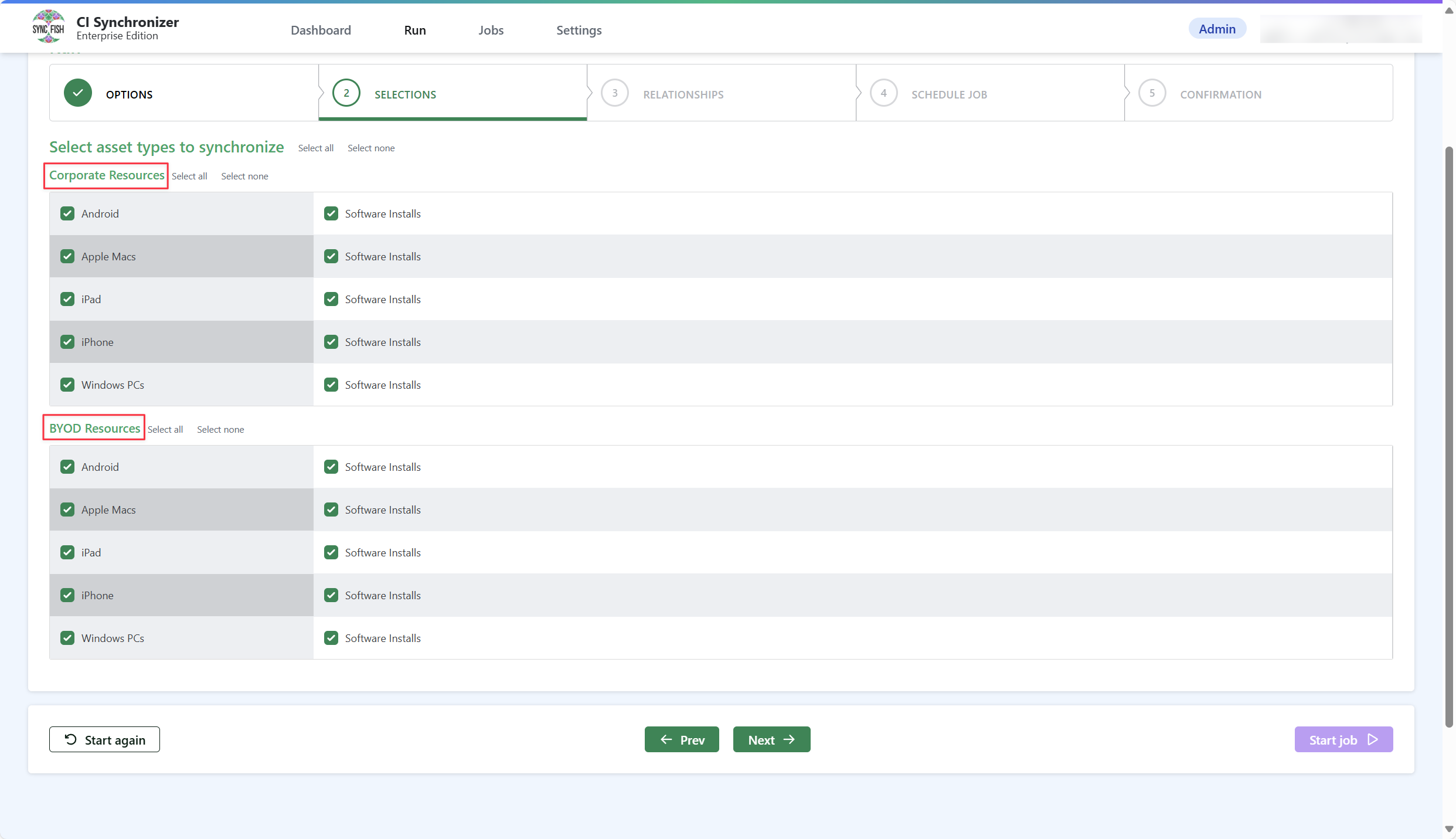
Separation of Corporate vs Personal Devices in InTune
Within InTune, devices can be identified as owned by “Corporate” or “Personal” (the latter reflecting BYOD devices).
CI Sync does two things by default in relation to Corporate vs Personal/BYOD devices:
-
CI Sync shows Corporate and BYOD devices separately in Step 2 (Selections) when creating a synchronization job (see the screen shot below for the UI behaviour).
-
CI Sync maps Corporate Devices into different CMDB CI tables compared with BYOD Devices (as per the mapping table further above).
Override Options
Context
Customers may want to change the default behaviour as follows:
-
For Corporate and BYOD devices, customers may want to treat Corporate and BYOD devices the same, and therefore achieve the following:
-
Have a single set of records to select when creating a sync job in Step 2 (Selections).
-
Have a single set of CMDB CI mappings.
-
-
For all other asset target mapping changes, customers may want to change the mappings to target different CMDB CI Tables/Classes then those shown in the table above. This can often be required when existing CIs are already present in the CMDB (in Classes different to those shown below) and CI Sync is expected to correlate to the existing CIs.
Options
-
For Corporate and BYOD devices, customers can use a CI Sync connection setting to not split Corporate and BYOD devices.
-
For all other asset target mapping changes, customers can request Syncfish change the target tables as required.
Overriding via Connection Settings
For Corporate and BYOD devices, customers can perform the Corporate and BYOD device override using a “Connection Setting” via the CI Sync User Interface (i.e. customers can perform the overrides themselves). Additional information for this is available via the following documentation:
-
For a general overview of CI Sync Connection Settings please read Understanding the use of CI Sync Connection Settings.
-
For the specific CI Sync Connection Setting/s related to the rule described on this page please read BYOD Handling for InTune.
For documentation on all CI Sync Connection Settings please visit the page tree Connection Setting Guides.
Additional Information
N/A
Related Rules
Rule 12 - Separation of VOIP phones and Android devices for InTune