
Aim
This document introduces the concept of duplicate CIs in ServiceNow, why they occur, how to identify them and the process to follow to remediate them.
In brief, duplicate CI scenarios are possible due to data changes in source systems, typically as a result of an increase in IT assets or when a mix of discovery platforms have been implemented. Whilst CI Sync implements a number of orchestration steps to avoid duplicating CIs wherever possible, the situation can arise in which case this article can assist with the de-duplication process in ServiceNow.
Background information
The concept of records being duplicated in a database can be concerning and the ServiceNow CMDB is one such database where duplicate records can appear.
Whilst its not the intended state, it is possible to find that duplicate CIs exist in the CMDB due to data changes in the source system. The possibility increases as CMDB utilisation increases over time in conjunction with growth in IT assets and / or new technologies are explored to enhance automated discovery of assets. CI Sync implements a number of orchestration steps to avoid this wherever possible.
The good news is there are tools and processes in ServiceNow to identify and remediate duplicates on a continuous basis with minimal manual effort involved
If a duplicate scenario arises, this article will assist with the process of de-duplicating the records in ServiceNow
Why does duplication occur in the ServiceNow CMDB?
Duplication in the CMDB occurs whenever the following occurs:
-
the rules for identifying a CI uniquely do not reveal an existing match in the CMDB.
-
the rules for identifying a CI uniquely are not applied before creating a new CI.
In brief, identification rules determine whether the sync of a CI will result in the creation of a new CI or the update of an existing CI and are typically based on unique attributes of a device or asset e.g. serial number, MAC address or name. The rules can be different across CI classes and apply independently such that a Computer with the name of “MY HP DEVICE” should never be identified as a Printer on the basis that it has the same name.
It is the application of identification rules which actively prevents duplication in the CMDB and supports the following example scenarios:
-
a ServiceNow customer has manually populated their CMDB for several years and wants to seamlessly integrate CI Sync to automate CMDB sync via Lansweeper source whilst maintaining their existing CI inventory without duplication
-
a ServiceNow customer has migrated from another discovery platform to Lansweeper and CI Sync and wants to maintain their existing CI inventory without duplication
-
a ServiceNow customer wants to implement multiple discovery sources / platforms including CI Sync to maximise the completeness of CI records and doesn’t want duplication as a result
Both CI Sync and ServiceNow have pre-defined identification rules which can be modified to suit customer environments. CI Sync by default closely approximates the ServiceNow rules such that they are essentially a replica of the ServiceNow default rules. Reach out to Syncfish if you are considering introducing an additional discovery source / platform or expanding your current usage of CI Sync and want to discuss the implementation of identification rules.
Coming back to how duplication scenarios arise, when a device or asset is first discovered or discovered as updated and then presented to ServiceNow for syncing with the CMDB, if the rules for identification are not able to identify an existing CI as a match, then a new record will be created.
Due to the complexity associated with uniquely identifying each CI amongst a significant number of device types each with their own unique set of attributes and differences between customer environments depending on the discovery source / platforms implemented, there is no other mechanism to prevent duplication in the CMDB other than the application of identification rules.
A very simple example of this would be a scenario where a user creates a Computer CI manually with the same serial number as another Computer CI in which case identification rules are not checked to prevent the second CI being created. Another example would be where the unique attributes of an asset are not discovered as expected / non-discoverable resulting in no match with an existing CI during a sync job.
Whilst the asset manager or CMDB administrator may be able to tell that there are two copies of the same device in the CMDB (through examining the physical device, BIOS checks etc), ServiceNow and CI Sync are completely reliant on identification rules to find a CI match.
In a duplicate scenario, it is by design that ServiceNow will continue processing the record and populate the CMDB with the discovered attributes - either as a new duplicate CI or as an update to an existing duplicate CI. Review and remediation of duplicates is an ongoing CMDB maintenance activity.
Can duplication be prevented in the ServiceNow CMDB?
No, duplication of CIs cannot be prevented.
As per the detailed answer provided under the preceding question, duplication occurs by design when an exception scenario is encountered. The expected outcome for a duplicate scenario is a new duplicate CI or an update to an existing duplicate CI with the recently discovered attributes captured to aid comparison and further investigation.
How is duplication identified and remediated in ServiceNow?
Identification and remediation of duplicates centres around the following ServiceNow components:
-
De-Duplication Tasks
-
CMDB Workspace
De-Duplication Tasks
De-Duplication Tasks are created when a duplicate scenario is detected for tracking and remediation, providing further details such as the key identifier which links the duplicate CIs and links to the records involved.
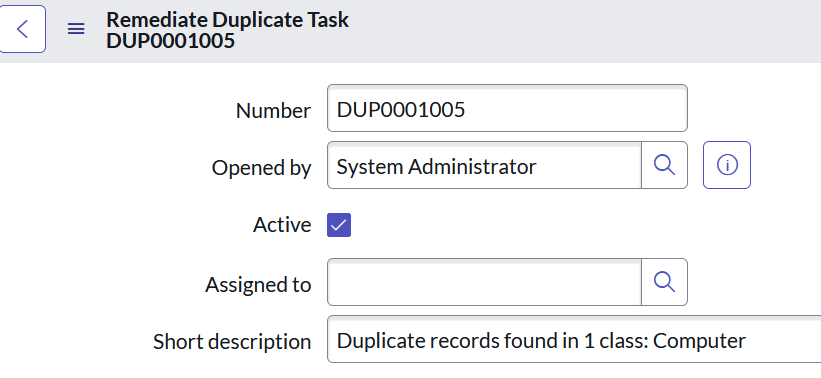

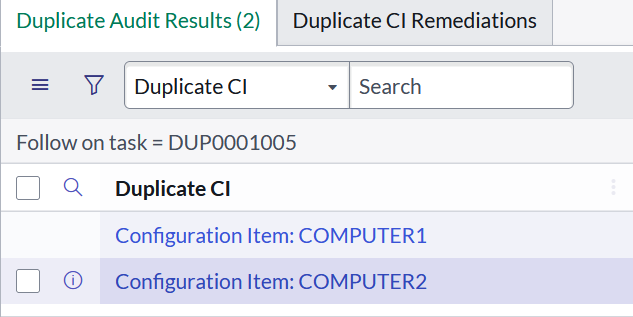
De-Duplication Tasks can be created automatically as a result of ongoing CMDB updates and, if CMDB Health is operational, the current state of duplicates will also be referenced in the CMDB Correctness metric.
However, there are exceptions and the existence of De-Duplication Tasks is dependent on the ServiceNow environment and discovery platforms implemented (both in the past and present).
If CI Sync is the only tool employed for CMDB population, we can anticipate that no De-Duplication Tasks will exist because no De-Duplication Tasks will ever be generated as a result of the normal operation of CI Sync because of its unique method of correlation and emphasis on performance (noting that configurable identification rules are present as previously mentioned)
CMDB Workspace
CMDB Workspace in ServiceNow is a centralised interface designed to help CMDB managers manage and visualise CIs within the CMDB.
With regards to duplicate remediation, CMDB Workspace provides a De-Duplication dashboard and a “de-duplication experience” to remediate duplicates efficiently in bulk and in a consistent manner, including automation on a scheduled basis if that is desired.
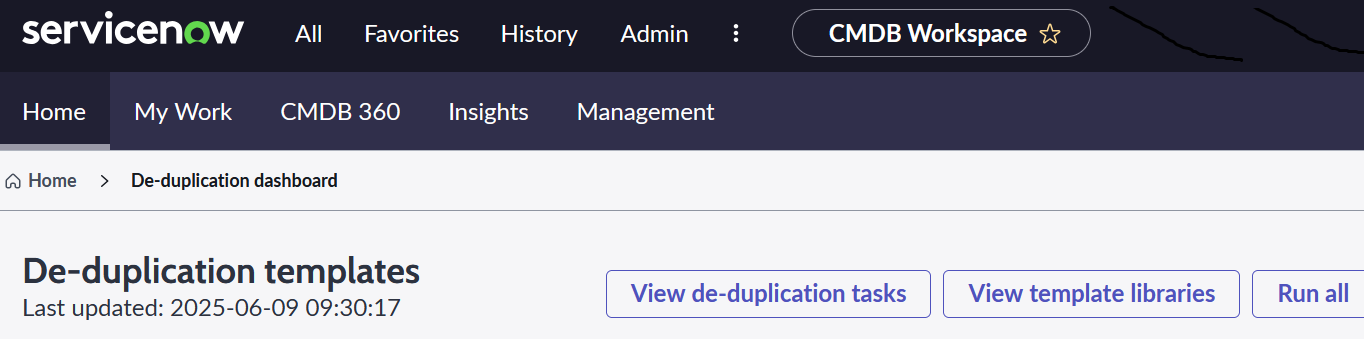
In CMDB workspace, the key to duplicate remediation is pre-defined templates. De-duplication Templates identify the rules and logic for handling duplicates to ensure that duplicate remediation is always executed following a standardised approach, reducing manual intervention and minimising errors.
Process
If you have become aware of duplicates in the ServiceNow CMDB (through CMDB Health reporting or the existence of De-Duplication Tasks) or you want to clean your CMDB of duplicates in advance of adopting CMDB Health, there is a process Syncfish can recommend to follow.
Before commencing this process, please consider if your organisation is maintaining asset records. If yes, it is important to be aware that de-duplicated CIs will also impact the related asset record – so if your organisation has maintained a value on a duplicate asset record there is a risk that the de-duplication process will impact this data. There are solution options for this – please reach out to the Support Team for guidance.
At a high-level, the general process flow:
-
Review the current data sources involved for CMDB population.
-
Review and validate identification rules which apply to uniquely identify CIs.
-
Refresh De-Duplication Tasks to reveal all current CI duplicates.
-
Create De-duplication Templates to standardise the remediation approach.
-
Remediate duplicates.
-
Consider whether ongoing remediation is necessary.
Identify data sources for CMDB population
As a first step, it is important to understand what are the data sources for CMDB population - both past and present.
Typical questions to be answered are:
-
Are there CI classes currently populated by multiple data sources? If so, can any sources be eliminated or are additional controls required to eliminate potential “source of truth” conflicts?
-
Are there any discovery platforms scanning the same devices? If so, is this for a known purpose e.g. one source is trusted to provide certain information / attributes over another?
The CMDB should be populated in a controlled manner, ensuring that only trusted data sources are involved. Selection of data sources should be based on the key information and attributes they provide to effectively support ITSM processes.
A single source for each CI class is best (like CI Sync) but not always possible to achieve.
Validate identification rules
From the identification of data sources involved with CMDB population, it may come to light that there are multiple sources populating the same CI class.
An example of this could be where two sources are involved to populate Computer CIs:
-
CI Sync creates / updates Computer CIs through Lansweeper discovery
-
Asset Management team are involved in procurement of end-user computing devices and will periodically create hardware assets (ServiceNow ITAM) which will consequently create a corresponding Computer CI.
The identification rules used across discovery platforms should be aligned to reduce the likelihood of duplicates being created under such scenarios, taking into account that both CI Sync and ServiceNow have pre-defined but separate sets of identification rules with CI Sync closely approximating the ServiceNow rules by default (as discussed earlier in this article).
Refresh De-Duplication Tasks
In order to take advantage of CMDB Workspace “de-duplication experience”, there needs to be existing De-Duplication Tasks which identify CIs in duplicate for remediation.
For various reasons, the CMDB may contain duplicates without corresponding De-Duplication Tasks to identify the duplication. By design, ServiceNow only checks existing CIs for possible duplication by exception through daily CMDB Health jobs.
Alternatively, there may be a large number of existing De-Duplication Tasks due to a variety of data sources involved over a large period of time and uncertainty creeps in about the validity of them.
Fortunately, through scripted methods, it is relatively simple to refresh De-Duplication Tasks to both remove false positives and conduct a thorough scan of the CMDB to identify all current duplicates through De-Duplication Tasks.
Create De-duplication Templates
De-duplication Templates identify the pre-defined rules to be applied during automated executions remediation jobs, targeting the CIs associated with De-Duplication Tasks. Only published templates can be applied to remediation jobs.
The latest ServiceNow documentation is the best source of reference for how to create a De-Duplication Template but features of note are:
-
Templates apply to a specific CMDB class with the option to include all child classes
-
Templates can be restricted via conditions or script to target specific groups of CIs
-
Logic for identifying the “main CI” amongst a set of duplicates is configurable
-
Logic for merging attributes is extremely granular, including handling of null values and attribute selection
-
Relationship merging is configurable
-
Related items such as incidents, changes etc. can be automatically processed to reference the “main CI” after remediation
-
Logic for remediating the duplicate CIs is configurable i.e. delete all duplicates or retain and update attributes(s) on duplicates.
Remediate duplicates
With De-Duplication Tasks refreshed and De-Duplication Templates published, we are ready to remediate duplicate CIs.
From a remediation job perspective, the options are:
-
Remediate a single De-Duplication Task using a published template
-
Remediate all De-Duplication Tasks associated with a published template
-
Assign one or more De-Duplication Tasks to a published template for remediation
-
Run all published templates at once to remediate all associated De-Duplication Tasks
The remediation job runs as a background process and can be monitored via the De-Duplication Dashboard.
Consider ongoing remediation
Whilst effort may have been put into reviewing how duplicate scenarios come about in the first place and resolving these as part of the remediation process, it is not always possible to eliminate the root cause hence ongoing remediation can be a useful fallback measure.
Once there is some confidence with the results achieved through review of outcomes from automated remediation jobs, ongoing remediation can be considered on a recurring basis. This involves identifying the published template to be referenced for scheduled remediations and creating a schedule using the typical parameters e.g. periodic frequency, time etc. This can be monitored after the fact given that the De-Duplication Tasks will still exist as “Completed” tasks with associated notation regarding the actions carried out.
Given that De-Duplication Tasks are necessary for automated remediation to function, we can look to the scripted methods as discussed earlier in this article to fill the gaps when CI Sync is the primary tool for CMDB population as mentioned earlier in this article.
Conclusion
Achieving a cleaner CMDB may seem daunting at first, but with a strategic approach and the expertise of trusted partners like Syncfish, it’s possible to establish a solid CMDB foundation for long-term, low-maintenance success. the initial investigative and configuration effort should be a once off activity.
Please reach out to Syncfish if you need assistance with the process and / or any of the remediation steps identified in this article.
Related Articles
N/A
Further reading
Components and process of Identification and Reconciliation in ServiceNow
https://www.servicenow.com/docs/csh?topicname=c_CompsandProcessIDandReconcil.html&version=latest
Identification Rules in ServiceNow
https://www.servicenow.com/docs/csh?topicname=c_IdentificationRules.html&version=latest
CI de-duplication experience in ServiceNow CMDB Workspace
https://www.servicenow.com/docs/csh?topicname=dedup-ci-exp-cmdb-workspace.html&version=latest
About CMDB Health - Duplicate Metric algorithm in ServiceNow
This article identifies why CMDB Health doesn’t scan all CIs daily for duplicates and thus gaps in duplicate detection can occur
https://support.servicenow.com/kb?id=kb_article_view&sysparm_article=KB0726425
Control Information
|
Created |
|
|---|---|
|
Reviewed |
|
|
Data Classification |
PUBLIC
|