
Rule Synopsis
These are the rule/s that control how CI Sync deduce the Location value of a given Lansweeper Asset using several standard data elements within Lansweeper.
Rule Details and Default
-
By default, CI Sync does not persist any form of Location against each CMDB CI record.
Override Options
Context
Customers may consider overriding the default rules so that CI Sync does set a Location against the target CI record. CI Sync supports several standard Lansweeper data elements to deduce the Asset location. See the page details below for the standard override options.
If the standard Lansweeper data elements are not suitable, Syncfish can implement Custom Asset Location Determination rules (See ServiceNow (dest) Rule: Rule 4 – Custom Asset Location Determination Rules ).
ServiceNow Configuration Tip
If you include Latitude and Longitude values to the ‘cmn_location’ records in ServiceNow this can be leveraged on mapping features to show your CIs by geographical location (for example on a Google Map using the ServiceNow CMDB Health Dashboard).
Setting up the CMDB Health Dashboard in ServiceNow can add significant value to your Lansweeper/CI Synchronizer subscription.
Syncfish can provide professional service packages to assist customers with the setup of CMDB Health Dashboard (and other ServiceNow features to leverage your automated CMDB).
Options
-
This Data Sync Rule can be overridden so that CI Sync does persist an automatically determined Location against each CMDB CI record. The persisted value with be a sys_id reference between the CI record and the corresponding record in the cmn_location table.
If customers enable the above override (so CI Sync persists a determined location value) there are three Lansweeper location data elements that can be selected for use by CI Sync to determine the location of each Asset/CI:
-
Standard CI Sync Location Rule Override 1: Lansweeper IP Locations and IP Location attribute.
-
Standard CI Sync Location Rule Override 2: Asset Location (sometimes referred to as “Map or Blueprint Location”).
-
Standard CI Sync Location Rule Override 3: Custom Location (or manual Asset Location attribute.
See Additional Information below on how Lansweeper implements the three options and the operation of the Standard CI Sync Locations Determination rules.
Overriding via Connection Settings
Customers can perform the override using a “Connection Setting” via the CI Sync User Interface (i.e. customers can perform the overrides themselves). Additional information for this is available via the following documentation:
-
For a general overview of CI Sync Connection Settings please read Understanding the use of CI Sync Connection Settings.
-
For the specific CI Sync Connection Setting/s related to the rule described on this page please read Location Data Handling for Lansweeper On-Prem
For documentation on all CI Sync Connection Settings please visit the page tree Connection Setting Guides.
Additional Information
Standard Location Rule Override 1: Lansweeper IP Locations and IP Location attribute
Firstly, Lansweeper context
-
IP Locations are a form of Dynamic Asset Groups within Lansweeper. IP Locations are created under the Configuration > Asset Groups menu in the Lansweeper Web Console.
-
IP Locations are used for grouping assets. They do not affect which IP ranges are scanned.
-
IP Locations are different from IP Scanning Targets (the latter are set under the Scanning > Scanning Targets menu in the Lansweeper web console).
-
This Lansweeper page may be useful for customers wanting further information about this Lansweeper feature.
Next, How CI Sync Handles Lansweeper IP Locations
-
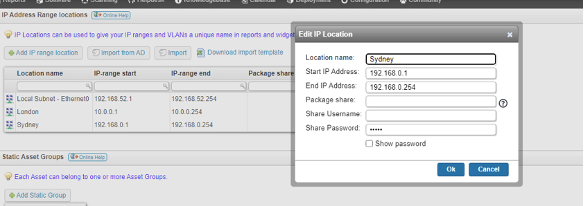
CI Sync reads the IP Range Location value associated with each incoming asset.
-
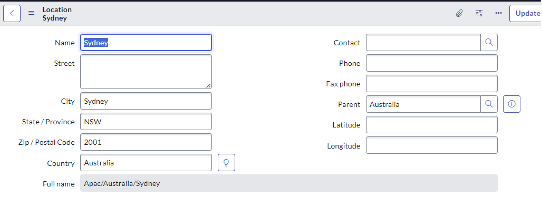
CI Sync attempts to match the IP Range Location value against an existing record in the cmn_location using the cmn_location.name attribute.
-
If CI Sync matches an incoming IP Range Location value to a record in the cmn_location table, CI Sync sets a foreign key reference between the location attribute on the CI record itself and the matching record in cmn_location table.
-
If CI Sync does not match an incoming IP Range Location value against the cmn_location table, then CI Sync will do one of the following:
-
Either insert/create a new cmn_location record (and set a foreign key reference between the CI and the newly created location record)
-
Or, not insert/create a new cmn_location record (and obviously not set a foreign key reference, so the location attribute on the CI will be nul).
-
Note 1: The above behaviour (to insert/create new cmn_locations records or not) is controlled by “Data Sync Rule 11 - Automatic Creation of new Location Records in ServiceNow”.
-
Note 2: If there are multiple IP Locations in Lansweeper with the same name (such as two subnets in an IP Range Location), then these will be set in ServiceNow to the same cmn_location value (i.e. CI Sync does not create duplicate locations with the same name).
-
-
-
The following screen shots show how CI Sync uses Lansweeper IP Range Location records and ServiceNow cmn_location records.
|
Lansweeper “IP Range Location” record |
ServiceNow cmn_location record |
|---|---|
|
|
Standard Location Rule Override 2: Asset Location
Firstly, Lansweeper context
-
In Lansweeper this is sometimes referred to as a “Map or Blueprint Location”.
-
Lansweeper includes a feature that allows customers to represent assets on a diagram (e.g. floor plans or other diagrammatic objects).
-
To use this feature, customers use the Asset > New Location menu in the Lansweeper web console. Customers then create a relationship between an Asset and the Location Map/diagram.
-
As a result, individual assets with such relation inherit the associated Location. Note: Location maps are technically assets as well. When placing a Windows computer on a location map for instance, you are effectively creating an asset relation between the Windows computer asset and the location map asset.
-
This Lansweeper page may be useful for customers wanting further information about this Lansweeper feature.
Next, How CI Sync Handles Lansweeper Asset Locations
-
CI Sync reads the Asset Location value from the relationship that has been set in Lansweeper (using the technique noted above).
-
CI Sync attempts to match the Asset Location value against an existing record in the cmn_location table using the cmn_location.name attribute.
-
The matching behaviour of CI Sync, including whether CI Sync automatically creates new cmn_location records or not, is described in the previous section called “Standard Location Rule Override 1: Lansweeper IP Locations”.
Standard Location Rule Override 3: Custom Location (or manual Asset Location) attribute
Firstly, Lansweeper context
-
In Lansweeper this is sometimes referred to as a “Custom Location”.
-
Lansweeper includes an out-of-the-box Asset Location attribute.
-
The Location attribute is only automatically filled when found through SNMP scanning for network devices. In all other circumstances the field maintained manually.
-
As the Location attribute is free text it requires customers to maintain the integrity of this data.
Next, How CI Sync Handles the Lansweeper Location Attribute
-
CI Sync reads the Location Attribute value from each incoming Lansweeper Asset.
-
CI Sync attempts to match the Location Attribute value against an existing record in the cmn_location table using the cmn_location.name attribute.
-
The matching behaviour of CI Sync, including whether CI Sync automatically creates new cmn_location records or not, is described in the previous section called “Standard Location Rule Override 1: Lansweeper IP Locations”.