
Aim
To maximise synching efficiency the CI Sync instance should be hosted as closely as possible to the destination ServiceNow instance (unless there is a valid reason not to do so).
This article explains how to identify the physical hosting location of a ServiceNow instance.
Process
To locate the geographic hosting location of a ServiceNow instance perform the following:
-
Login to your ServiceNow instance with elevated/admin privileges.
-
Navigate to https://<yourCompanyDomain>.service-now.com/stats.do.
-
Once stats.do is loaded, locate the second row called “Connected to cluster node”.
Find the part of the string that identifies the data centre location (it is second portion of the string as shown by the red arrow below).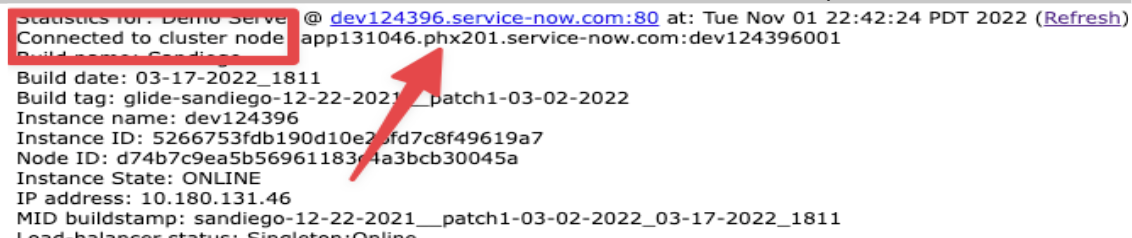
In this example, the code required is “PHX”.
-
The values used by ServiceNow are based on IATA locations (i.e. airport codes) which you can search here: https://www.iata.org/en/publications/directories/code-search/. Make sure to use the “Search Airport Codes” section (and not the “Search Airline Codes”).
Using the above example of “PHX” you can see the example instance will be hosted geographically in Phoenix, Arizona. Your company instance location will most likely differ, but the process is the same.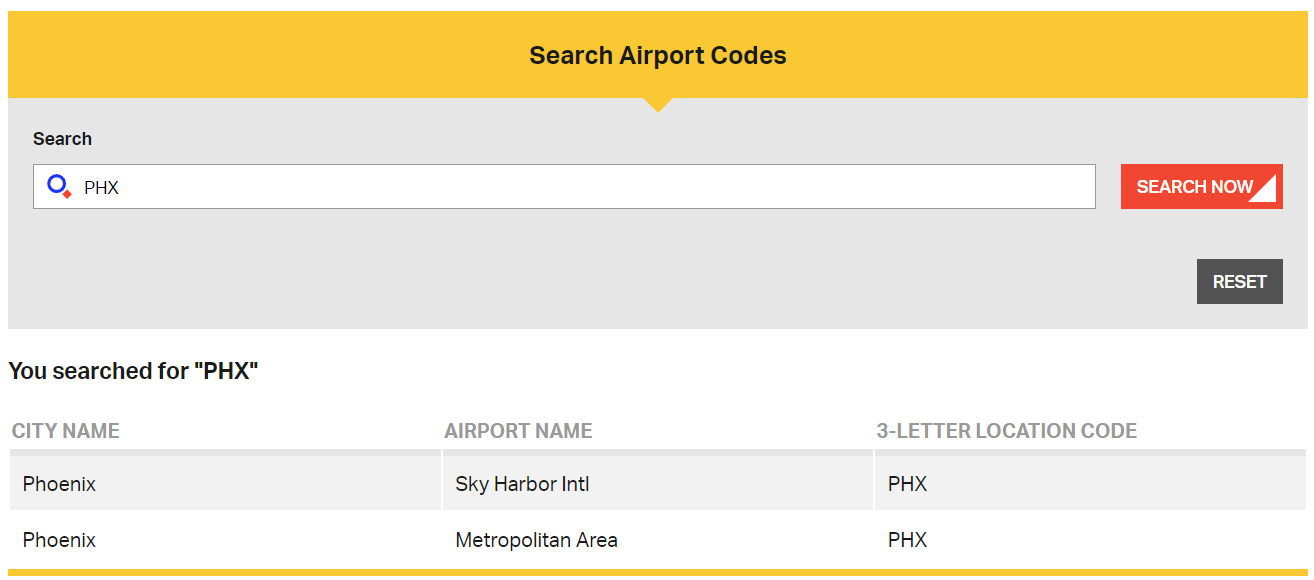
Related Articles
There are currently no related articles.
Control Information
|
Created |
|
|---|---|
|
Reviewed |
|
|
Data Classification |
PUBLIC
|