
Aim
Duplicates occurring in your ServiceNow instance can be frustrating and as the number of systems and integrations feeding Configuration Item data into your ServiceNow instance increases, so does the likelihood of duplicate CIs.
This article aims to provide you with a toolset to quickly and effectively remove duplicates in some of the specific key CMDB classes that CI Sync works with. This process can be run prior to enabling the CI Sync integration to ensure a clean starting population for CI Sync or after CI Sync (and indeed any other integrations) have been enabled.
It should be noted that Deduplication and CMDB Health monitoring is highly recommended as an ongoing practice for any organisation.
For additional background information on why duplicates can occur and related concepts → https://support.syncfish.com.au/cs/how-to-remediate-duplicate-cis-in-servicenow
Process
A “Deduplication Quick Start” update set has been provided with all the components required to get you deduplicating quickly.
Before commencing this process, please consider if your organisation is maintaining asset records. If yes, it is important to be aware that de-duplicated CIs will also impact the related asset record – so if your organisation has maintained a value on a duplicate asset record there is a risk that the de-duplication process will impact this data. There are solution options for this – please reach out to the Support Team for guidance.
What is contained in the Deduplication Quick Start update set?
The Update Set installed in the previous section contains the following artefacts:
|
Type |
Name |
Details |
|---|---|---|
|
Template Library |
(SF) Deduplication Quick Start |
The Template Library is accessible via CMDB Workspace | Management | De-duplication Template Library. |
|
Template |
(SF) Deduplicate - Computer |
Processes duplicates in cmdb_ci_computer. |
|
Template |
(SF) Deduplicate - Handheld Computing Device |
Processes duplicates in cmdb_ci_handheld_computing. |
|
Template |
(SF) Deduplicate - Windows Server |
Processes duplicates in cmdb_ci_win_server. |
|
Template |
(SF) Deduplicate - IP Switch |
Processes duplicates in cmdb_ci_ip_switch. |
|
Fix Script |
(SF) Purge de-duplication tasks |
Clears out any pre-existing Remediate Duplicate Tasks that may already exist. |
|
Fix Script |
(SF) CI Identification Audit |
Generates Remediate Duplicate Tasks that will be assigned to the Deduplication Templates. |
Installing the Deduplication Quick Start update set
Of course, Syncfish recommends always reviewing the toolset and process in a sub-production instance first.
Only perform these steps in Production once your team is familiar and prepared.
-
Download the Update Set here → download update set
-
Install the Update Set in your ServiceNow instance
-
Navigate to Retrieved Update Sets
-
Click the Import Update Set from XL Related Link.
-
Select and upload the XML Update Set file.
-
Preview Update Set and then Commit.
-
Deduplication Templates - General Configuration
Each of the four Deduplication Templates included in the Quick Start update set have been configured similarly as per the table below.
For further information on Deduplication Template attributes and how to create, maintain and publish them please refer to Create a de-duplication template
|
Option |
Selected Value |
|---|---|
|
Automatically select all de-duplication tasks that match the selected class |
Yes |
|
Add all child classes |
No |
|
Select Main CI (to be kept) |
Oldest Created |
|
Merge Attributes |
None selected |
|
Merge Relationships |
Merge all relationships |
|
Merge Related Items |
Merge default related items |
|
Duplicate CI Actions |
Delete |
Deduplication Process
The deduplication process consists of 3 main steps:
Step 1 - Purge any existing “Remediate Duplicate Tasks”
This step ensures you are starting with a clean slate - this step will clear any active Remediate Duplicate Tasks that exist for Computer, Windows Server, Handheld Computing Device or IP Switch.
Note: If you would prefer to only clear a subset of the Remediate Duplicate Tasks, the Encoded Query in the Fix Script can be altered accordingly.
-
Navigate to Fix Scripts and locate the (SF) Purge de-duplication tasks fix script.
-
Click Run Fix Script - it may be preferable to Run in Background if there are many tasks.
Step 2 - Regenerate “Remediate Duplicate Tasks”
This step will generate any Remediate Duplicate Tasks for the classes within scope: Computer, Windows Server, Handheld Computing Device or IP Switch.
-
Navigate to Fix Scripts and locate the (SF) CI Identification Audit fix script.
-
Click Run Fix Script - it may be preferable to Run in Background if there are many tasks.
Step 3 - Regenerate “Remediate Duplicate Tasks”
This step will associate the Remediate Duplicate Tasks with the appropriate Deduplication Templates and correct the duplicates.
-
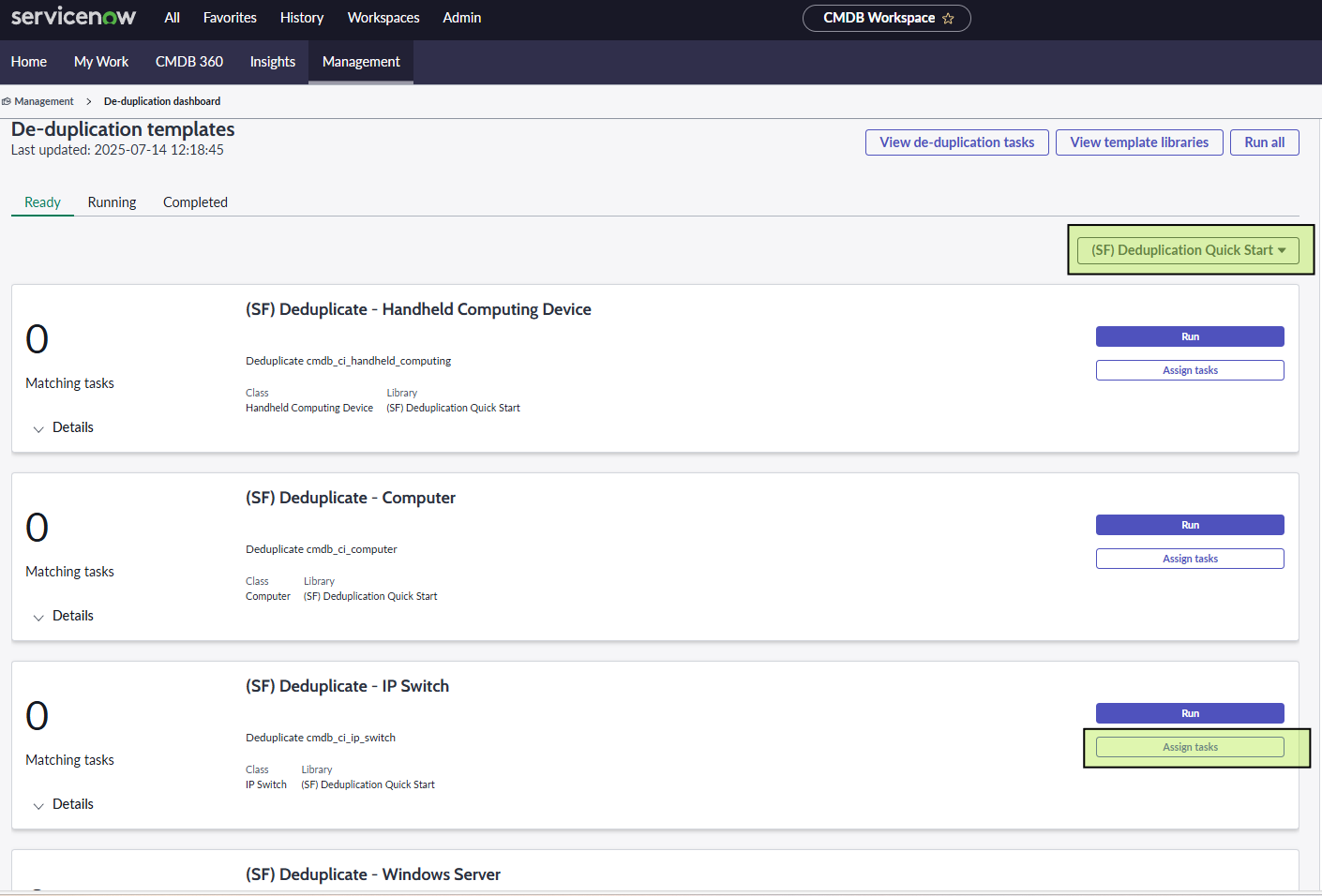
Navigate to CMDB Workspace | Management | De-duplication dashboard
-
You can filter by the library “(SF) Deduplication Quick Start” - which will display the 4x De-duplication templates below.
-
To process one of the Templates, click Assign Tasks.
-
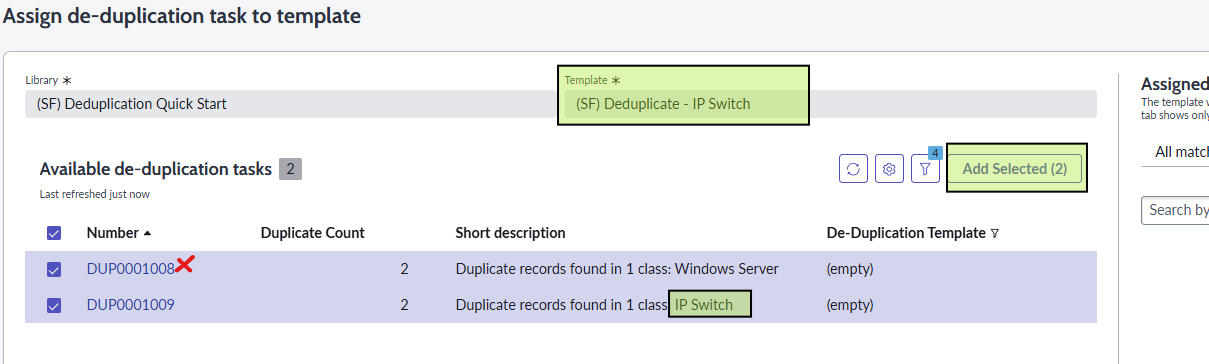
You will be presented with a list of available de-duplication tasks which can be selected against the Template. Select tasks individually or select the page of tasks and click Add Selected.
-
Note - not all tasks in the list will be applicable to the template. If any of the tasks selected do not match the template they will not be selected.
The diagram below illustrates a Windows Server task attempted to be selected into an IP Switch Template which is not applicable and is rejected per the Template configuration.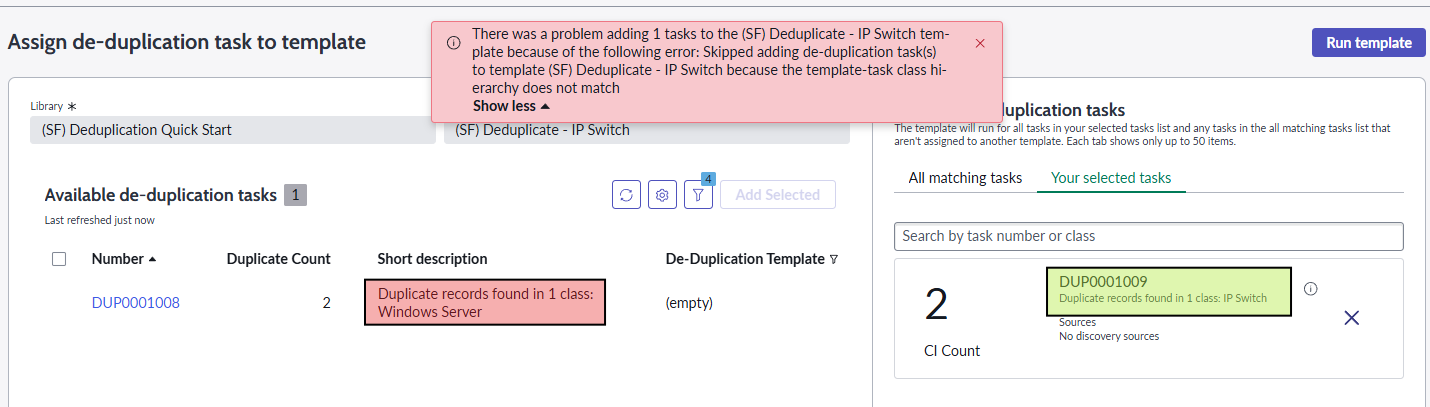
-
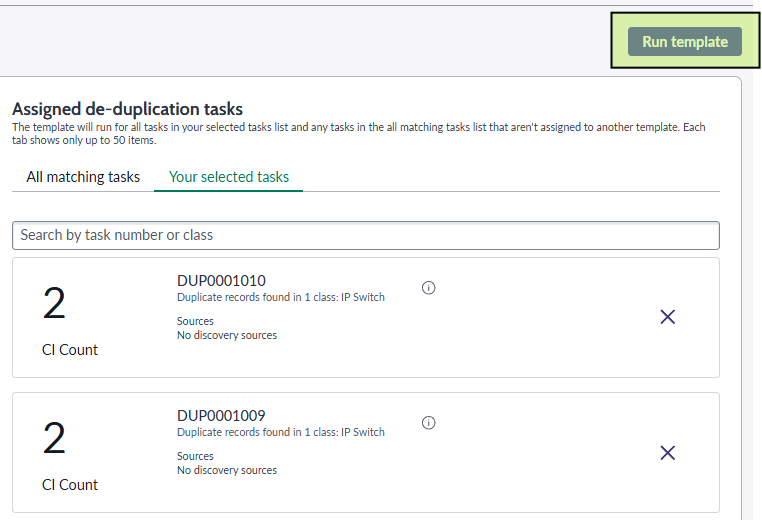
After all Remediate Duplicate Tasks have been added to the Template, click Run template. You will be presented with a message stating the Template has been added to the queue.
-
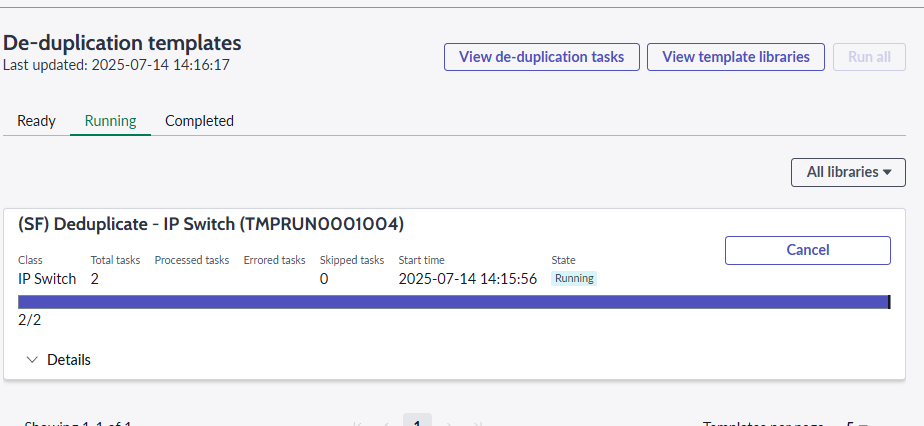
Back on the De-duplication Dashboard you can view the state of the Template running via the Running tab. The list can be filtered by the Template Library you are working with.
-
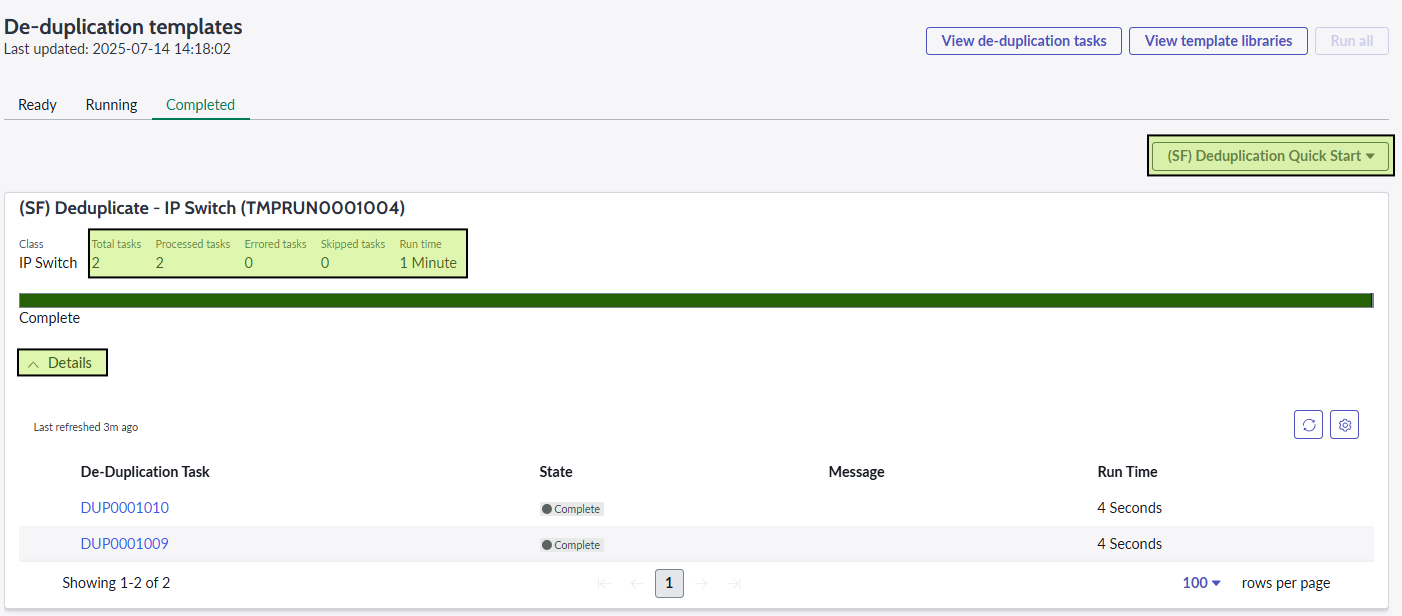
Once Complete, you can see the processing results from the Completed tab. You can expand the list for individual Task processing details.
Recommendation:
Syncfish recommends that after deduplication has been performed, a full sync job for the remediated classes be performed.
Conclusion
Duplicate CI records can occur during the normal course of business for any number of reasons.
This article has illustrated a quick method to use the standard toolsets offered by ServiceNow to remediate duplicates in a scalable and consistent manner. The quick start Templates will give you a model to develop other duplicate scenarios that may arise in your instance and the familiarity in their use.
For any questions on their use please contact Syncfish Support via https://syncfish.atlassian.net/servicedesk/customer/portal/2/group/2/create/9
Related Articles
See also:
https://support.syncfish.com.au/cs/how-to-remediate-duplicate-cis-in-servicenow
Control Information
|
Created |
|
|---|---|
|
Reviewed |
|
|
Data Classification |
PUBLIC
|