
Aim
You may want or need to remove CIs that were created by the CI Sync process. This article helps you with a process to do this.
Process
The process below is for sub-prod environments and testing purposes.
If you require this process performed in PRODUCTION please contact Syncfish Support before progressing
-
You can download the update set here → cisync-ci-deletion-fix-script.xml. Save it locally (use save as in your browser if the XML doesn’t download and instead opens/views in the browser)
-
Retrieve, Preview and Commit the update set into your non-prod ServiceNow.
-
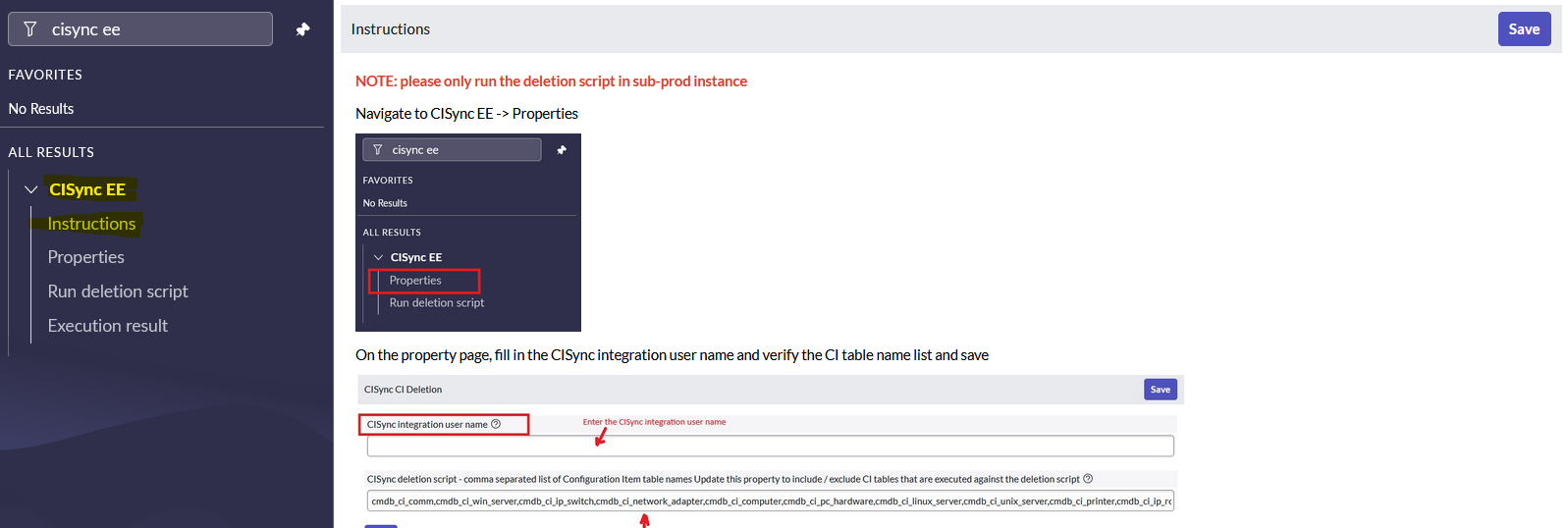
Once deployed you can then navigate to the CI Sync EE menu item (in the ServiceNow menu) and review the Instructions menu item for the steps needed to setup and run the script.
-
You will need to enter the name of the sys_user account you created for the CI sync integration. See the screen shot below, have a quick read of the instructions and ping with any questions etc as needed.
-
Click Run Deletion Script, then click Run Fix Script.
-
Results can be reviewed from the Execution Results menu item.
-
Related Articles
There are currently no related articles.
Control Information
|
Created |
|
|---|---|
|
Reviewed |
|
|
Data Classification |
PUBLIC
|