
Synopsis and Purpose
This FAQ explains several concepts about cloud Tags (and cloud Labels from GCP) and VMware Custom Attributes and how CI Sync handles these when synchronizing into ServiceNow.
n.b. In this document any references to cloud tags and labels are also applicable to VMware Custom Attributes.
General Context
Cloud Tags (and in the case of GCP Cloud Labels) often store highly valuable metadata which can add significant value if sync’d against the related CIs in the ServiceNow CMDB.
However, many organisations face challenges with traditional synchronization technology that cannot handle a lack of standardisation in the way Tags and/or Labels have been implemented and maintained (or not maintained) over time. Typical challenges include:
-
A lack of naming standardisation - i.e. a lack of standardisation of Tag names across the organisation. For example: the “Environment” tag is called “Environment” in some cases but “Env” in other cases).
-
A lack of value standarisation - i.e. different values being entered for what is essentially the same thing. For example: The “Owned by” attribute having values such as “Andrew Kent” in some cases but “Andrew_Kent” in other cases or “Andrew.Kent” and so on.
-
Different cloud providers supporting different character sets - i.e. in GCP Labels may not support full-stop, space or @ symbol. For example: The “Owned by” attribute values might expressed as “Andrew_Kent_at_syncfish_dot_com_dot_au”.
CI Sync tackles all of these challenges using a sophisticated yet flexible (and user configurable) via Connection Settings which can be updated via the CI Sync User Interface.
This FAQ answers to typically asked questions about these topics. Syncfish recommend customers commencing a Tag (or Label) synchronization journey read these FAQs in conjunction with the following additional guides:
Questions and Answers
How does CI Sync deal with multiple Tags (or GCP Labels) that represent the same thing but have been named differently in the cloud provider system?
Problem: A real world example of the problem might be …
The “Cost Center” Tag is expressed with the following variations, yet all are intended to represent the one thing (i.e. which cost center should be recharged for the cost of running a given cloud resource).
-
CostCenter
-
Cost Center
-
Cost_Center
-
CostCenterTag
-
CostCenterLabel
Solution: CI Sync uses a Regular Expression (RegEx) to identify multiple but differently named Tags that in fact represent the same attribute/characteristic of the cloud resource. This means CI Sync will treat one cloud resource that has a Tag called “CostCenter” the same as another cloud resource that has a Tag named “Cost Center” or “Cost_Center”, and so on.
Note: If multiple Tags on a single cloud resource match the defined regEx for a given cloud resource, CI Sync will extract the value from each matching Tag and CI Sync will search the relevant destination table in ServiceNow (e.g. against the cmd_cost_center table for a Cost Center Tag). The first matching value will be used by CI Sync when persisting the value against the CI record.
How does CI Sync deal with an individual Tag (or GCP Label) that contains multiple values (e.g. comma separated values)?
Problem: A real world example of the problem might be …
The “Cost Center” Tag contains a comma separated list of cost center values. For example:
-
LON489769, LON397609, UK1276099
Solution: If there are multiple comma or semi-colon separated values within a given Tag (including across multiple Tags per the previous Q&A above), each value will be extracted by CI Sync and searched individually against the relevant destination table in ServiceNow (e.g. against the cmn_cost_center). The first matching value will be used by CI Sync when persisting the value against the CI record.
How does CI Sync map Tags (or GCP Labels) to discrete attributes in ServiceNow?
CI Sync internally maps the OOTB supported Tags to discrete attribute in ServiceNow.
During a sync job CI Sync persists the value of the incoming Tag against CI as a reference to the relevant ServiceNow reference table. Once a match is returned (against the reference table), CI Sync updates the CI with a reference to the relevant entry in the reference data table. If no match is found, the attribute on the CI will be blank.
As expected, a discrete field is singular (i.e. one attribute only) and is only intended to store a single value (i.e. is not intended to store multiple values).
See the table below for the CI Sync defaults for each Tag/discrete attribute.
|
CI Sync OOTB Tag |
ServiceNow Discrete Attribute
|
ServiceNow Reference Table for the Discrete Attribute |
|
|---|---|---|---|
|
1 |
Cost Center |
cost_center |
cmn_cost_center |
|
2 |
Environment |
environment |
sys_choice |
|
3 |
Business Unit |
business_unit |
business_unit |
|
4 |
Department |
department |
cmn_department |
|
5 |
Company |
company |
core_company |
|
6 |
Change Control |
change_control |
sys_user_group |
|
7 |
Owned by |
owned_by |
sys_user |
|
8 |
Assigned to |
assigned_to |
sys_user |
|
9 |
Assignment group |
assignment_group |
sys_user_group |
|
10 |
Managed by |
managed_by |
sys_user |
|
11 |
Managed by group |
managed_by_group |
sys_user_group |
|
12 |
Supported by |
supported_by |
sys_user |
|
13 |
Supported by group |
support_group |
sys_user_group |
How does CI Sync make use of discrete attributes in ServiceNow vs the cmdb_key_value table to store free-form key/value attribute pairs against CIs?
Firstly, CI Sync maps the incoming Tag to a discrete attribute in ServiceNow (as explained in the prior question).
However, a discrete reference field is singular by nature and is therefore only able to store a single value (i.e. discrete reference fields cannot store multiple values). As such, CI Sync takes advantage of the cmdb_key_value table as explained below.
Secondly, CI Sync persists entries in the cmdb_key_value table for each Tag (or Label) and for the one or more values in each Tag (or Label). This is one of the intended usages of cmdb_key_value, that is to store free-form key/value attribute pairs against CIs.
The screen shot below shows an example of the cmdb_key_value table for a single cloud resource CI record in ServiceNow.
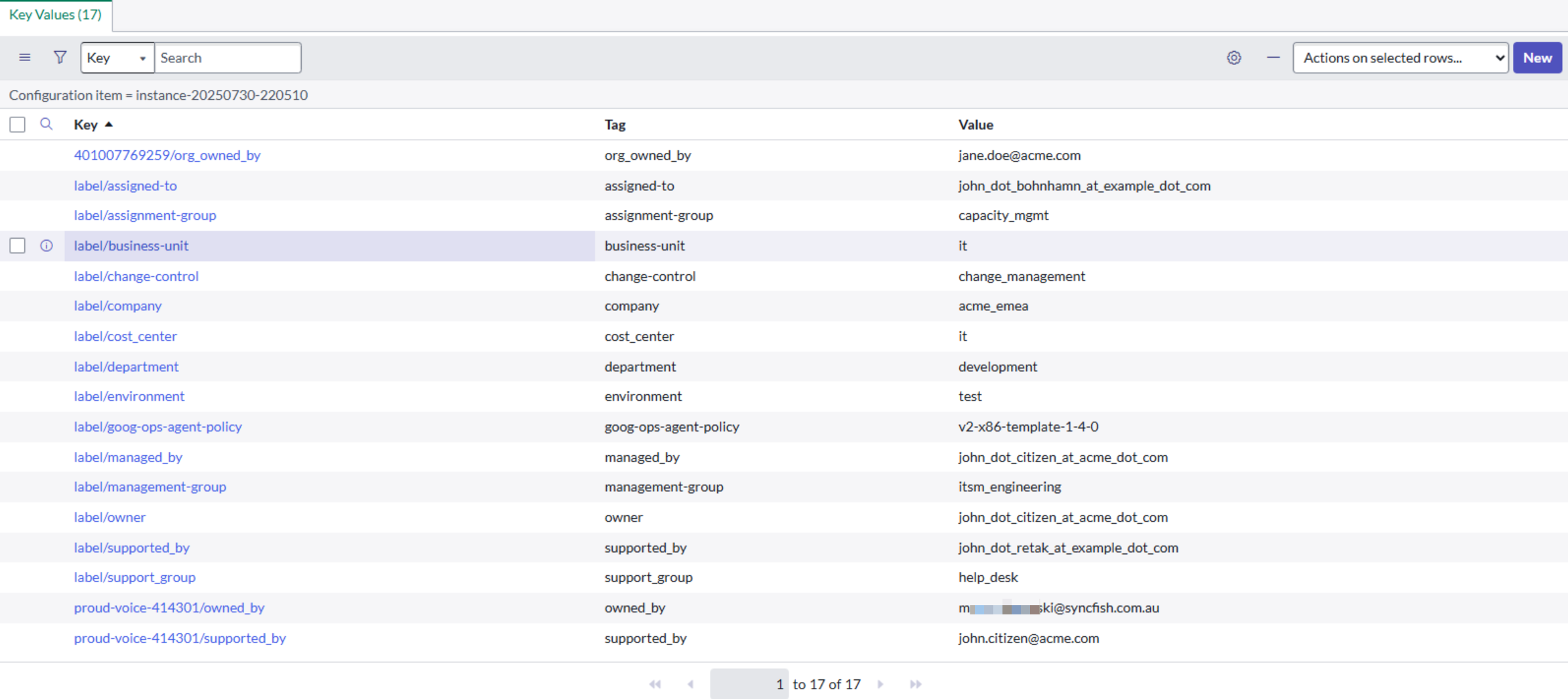
Key Points about the screen shot shown above:
-
The screen shot is an example from a GCP synchronization job. For GCP CI sync has several specific behaviours:
-
GCP Labels (as distinct from GCP Tags) are prefixed by CI Sync with the string “lable/”.
-
GCP Tags (as distinct from GCP Labels are prefixed with either the GCP Organisation ID or GCP Project ID as follows:
-
If the Tag is defined at the Organization level in GCP, CI Sync prefixes the entry with the Organization ID.
-
If the Tag is defined at the Project level in GCP, CI Sync prefixes the entry with the Project ID.
-
In the screen shot above:
-
401007769259/org_owned_by is a Tag defined at the Organization level.
-
proud-voice-414301/owned_by is a Tag defined at the Project level.
-
-
-
-
For Azure and AWS (which use Tags rather than Tags and Labels), CI Sync does not prefix the Tag name in cmdb_key_value.
In summary (for the way CI Sync uses discrete attributes and the cmdb_key_value table)
By populating both the discrete field on the CI (e.g. the cost_center field) and the cmdb_key_value table (i.e. the related list against the CI), customers can identify CIs where the specific field is not populated but the related list of Labels and Tags contains a near match.
This approach allows customers to identify data quality issues in the source system using simple reports, dashboards or workflows within ServiceNow.
Related Articles
Control Information
|
Created |
|
|---|---|
|
Reviewed |
|
|
Data Classification |
PUBLIC
|