
Question
What are the options for Create Models at Version Depth.
Answer
-
Select the version depth level at which Software Models will be created. e.g.
-
Selecting “Ignore the Version” will create a Software Model for each distinct software package name, disregarding the version information.
-
e.g. Software packages “Adobe Acrobat” version “1.2.03998.1”, “Adobe Acrobat” version “1.2.5555.3” and “Adobe Acrobat” version “1.3.987.2” would all result in a single Software Model record of “Adobe Acrobat”
NB: ServiceNow calculates the Display Name for Software Models based on a combination of the name and version. When “Ignore the Version” is selected, the Software Models will be created with the Software Package name and a suffix of null. e.g. “Adobe Acrobat null”.
-
-
Selecting “The Major Version number only” will create a Software Model for each distinct software package and the first digit of the version number
-
e.g. Software packages “Adobe Acrobat” version “1.2.03998.1”, “Adobe Acrobat” version “1.2.5555.3” and “Adobe Acrobat” version “1.3.987.2” would all result in a single Software Model record of “Adobe Acrobat 1”
-
-
Selecting “The Major and Minor Version numbers” will create a Software Model for each distinct software package and the first two digits of the version number
-
e.g: Software packages “Adobe Acrobat” version “1.2.03998.1” and “Adobe Acrobat” version “1.2.5555.3” would both result in a single Software Model record of “Adobe Acrobat 1.2”. The software package “Adobe Acrobat” version “1.3.987.2” would result in a second Software Model record of “Adobe Acrobat 1.3”.
-
-
Selecting “The Major, Minor and Revision Version numbers” will create a Software Model for each distinct software package and the first three digits of the version number
-
e.g: Software packages “Adobe Acrobat” version “1.2.03998.1” would result in the creation of the Software Model record of “Adobe Acrobat 1.2.03998”. The software package “Adobe Acrobat” version “1.2.5555.3” would result in the creation of the Software Model record “Adobe Acrobat” version “1.2.5555“. The software package “Adobe Acrobat” version “1.3.987.2” would result in a second Software Model record of “Adobe Acrobat 1.3.987”.
-
-
Selecting “All Version numbers” will create a Software Model for each distinct software package and the all digits of the version number
-
e.g: Software packages “Adobe Acrobat” version “1.2.03998.1” would result in the creation of the Software Model record of “Adobe Acrobat 1.2.03998.1”. The software package “Adobe Acrobat” version “1.2.5555.3” would result in the creation of the Software Model record “Adobe Acrobat” version “1.2.5555.3“. The software package “Adobe Acrobat” version “1.3.987.2” would result in a second Software Model record of “Adobe Acrobat 1.3.987.2”.
-
-
NOTE: When a Software Package does not contain any of the version digits, those digits will be ignored/
-
e.g. if “All Version numbers” is selected and the software package is “Adobe Acrobat” version “1.3”, the Software Model will be created as “Adobe Acrobat 1.3”.
-
e.g. if “The Major, Minor and Revision Version numbers” is selected and the software package is “Adobe Acrobat” version NULL, the Software Model will be created as “Adobe Acrobat”.
-
-
-
You may also wish to perform the following customisations to your ServiceNow form layouts:
-
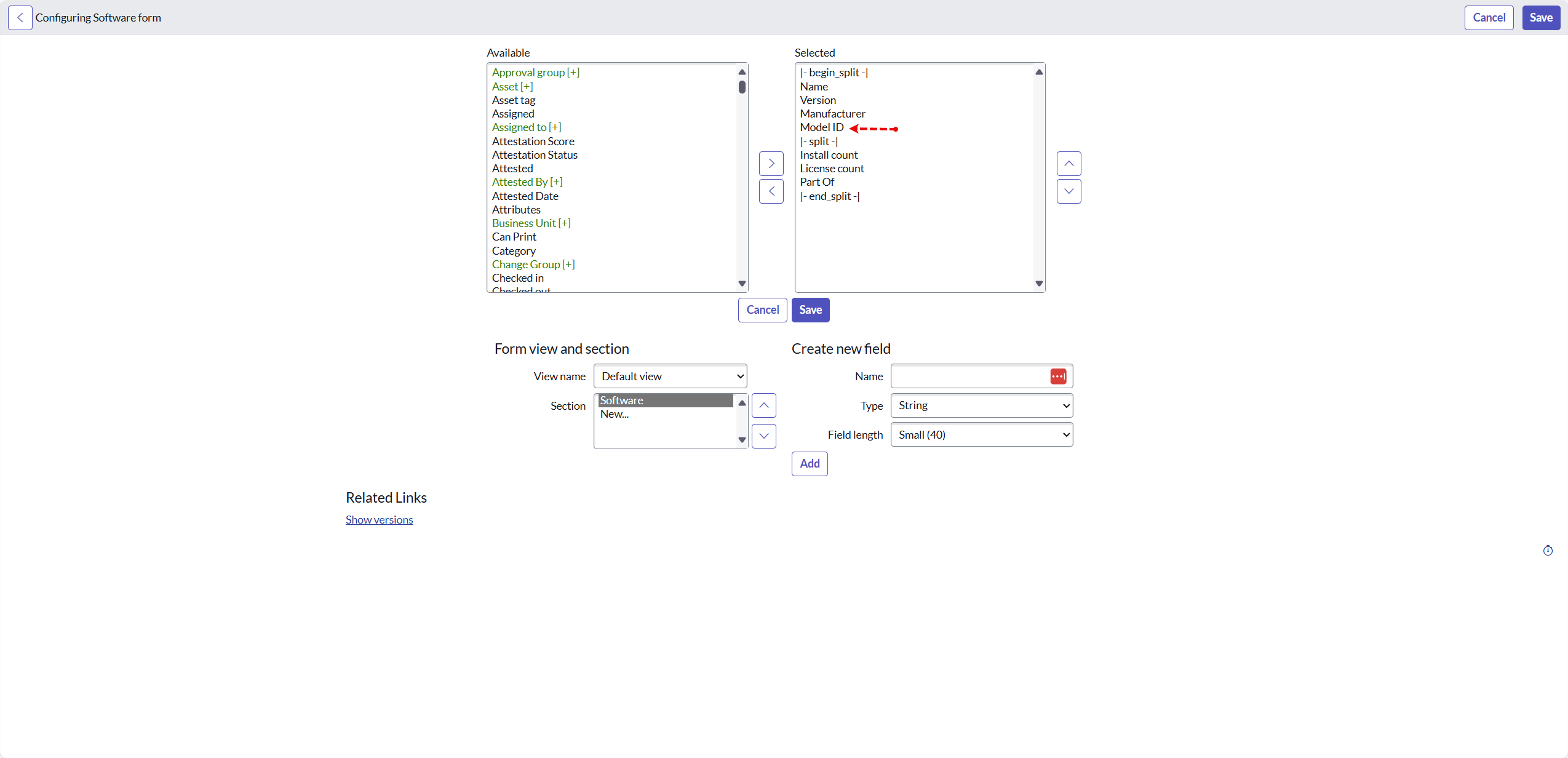
Software Package [cmdb_ci_spkg] - add the model_id field to the form layout:
-
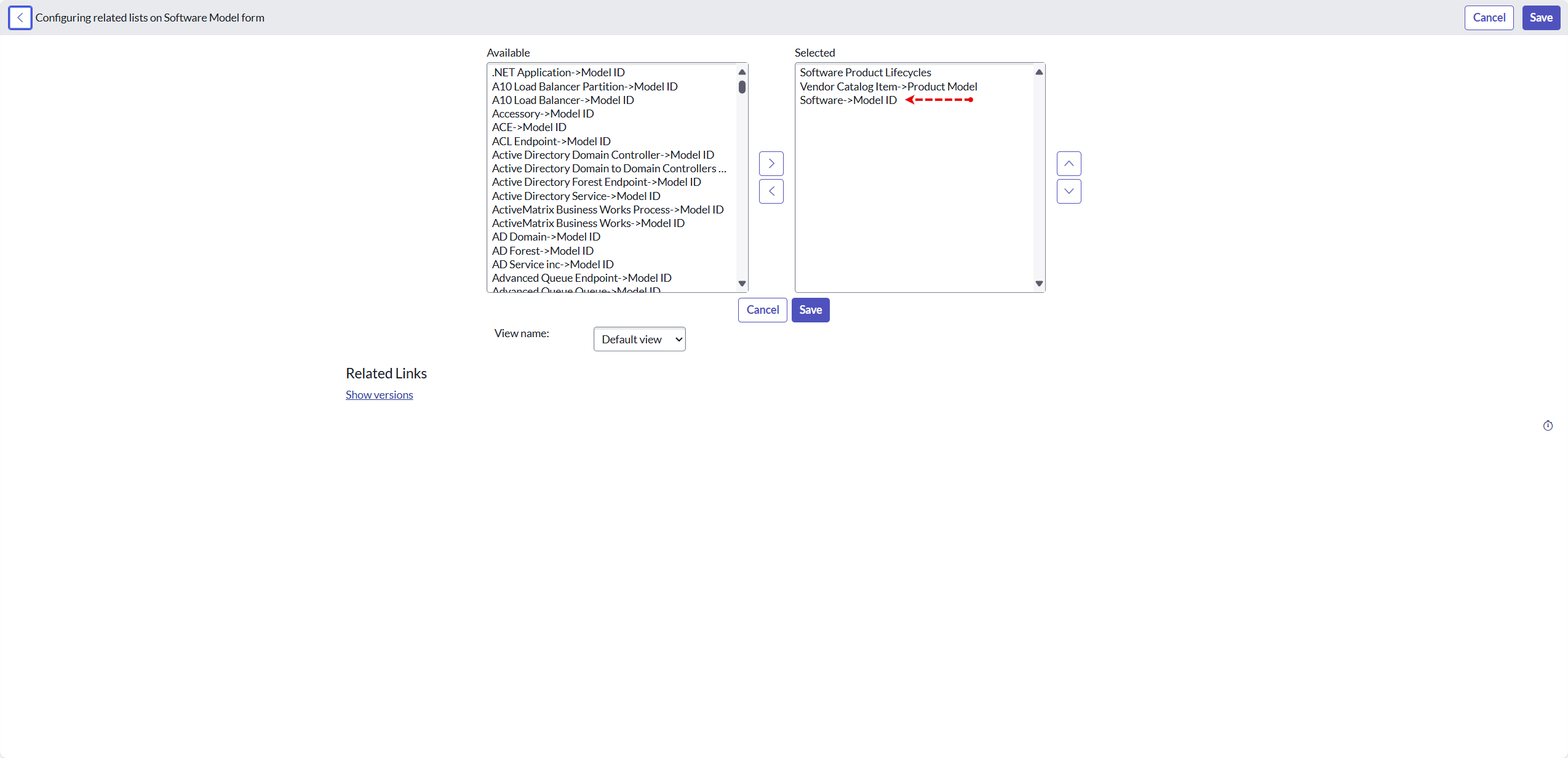
Software Model [cmdb_software_product_model] - add the “Software->Model ID” related list:
-