
Error experienced
Job fails with
SQL Timeout error : Timeout expired. The timeout period elapsed prior to completion of the operation or the server is not responding
"Agent:GBLPLCCW-V30015 Version:x-cise-agent-ver/2.2.0.0 Error:ProcessTaskActivity:Deletes;sqlErrorNum:-2;error:Timeout expired. The timeout period elapsed prior to completion of the operation or the server is not responding.;--SQL QUERY--: SELECT…
Error verification
No other error verification information is applicable.
Cause
SQL timeouts may occur for one or more reasons:
-
A database maintenance plan is not active or scheduled
-
A database maintenance plan does not include all required databases
-
A database maintenance plan is not run between Lansweeper scans and CI Sync jobs
-
Lansweeper is actively scanning whilst a CI Sync job is running.
-
The SQL Server is busy or has underlying performance issues.
-
A particular query used by CI Sync may need optimising.
Fix
The potential fix may be one or more of the suggested solutions below:
1. A database maintenance plan is not active or scheduled
It is recommended that a Database Maintenance Plan to rebuild indexes is active, scheduled and executed regularly after significant write activity occurs into a database.
For more details, see → How-to - Configure SQL Maintenance Plans on SQL database(s) for SQL based Source Systems Plan
2. A maintenance plan does not include all required databases
The active database maintenance plan should include both the source system database (if applicable) and the CI Sync Recver database for each given CI Sync Source Connection.
For example, if your organization is using the CI Sync Lansweeper & Intune Source Connections, the database plan should include:
-
the Lansweeper source database and the CI Sync Lansweeper RecVer database
-
the CI Sync Intune RecVer database
You can review the database names being used via the CI Sync Agent.
Note:
For any Source Connections that retrieve data from a SQL Server data store (i.e. Lansweeper but may include other Connectors), each CI Sync Source Connection will use a source DB and a RecVer DB.
That is, each Source Connection will use 2x databases and each of these databases should be included in the Maintenance Plan.
Reminder!
Remember to review and validate that the Maintenance Plans do their job!
After changes to the Maintenance Plan run some checks to validate
3. A maintenance plan does not rebuild indexes and update statistics
The database maintenance plan should include at a minimum:
-
Rebuild Index tasks - to minimise index fragmentation performance degradation.
-
Update Statistics tasks - to ensure the SQL Server query plans are optimised.
Be sure to include both task types.
https://support.syncfish.com.au/cs/ckb050-how-to-setup-a-rebuild-index-maintenance-pl
Reminder!
Remember to review and validate that the Maintenance Plans do their job!
After changes to the Maintenance Plan run some checks to validate
4. Database maintenance plans should run after Lansweeper scans and before CI Sync jobs
Any significant update activity on the Lansweeper database may affect performance of subsequent reads.
Ideally the sequence of events should be:
-
Lansweeper completes its scans.
-
The SQL Server maintenance plans run.
-
The CI Sync job/s run.
If your organization runs multiple scans or multiple CI Sync jobs per day - consider running the maintenance plans in between activity.
The example below illustrates an optimal scheduling setup of Lansweeper Scans, Maintenance and CI Sync Jobs:
-
One or more Lansweeper jobs being scheduled during any given period
-
A pause where the Maintenance Plan (including the Lansweeper DB and the associated CI Sync Recver DB) is executed.
-
The CI Sync job then runs
-
Lansweeper scan jobs resumed after the CI Sync job.
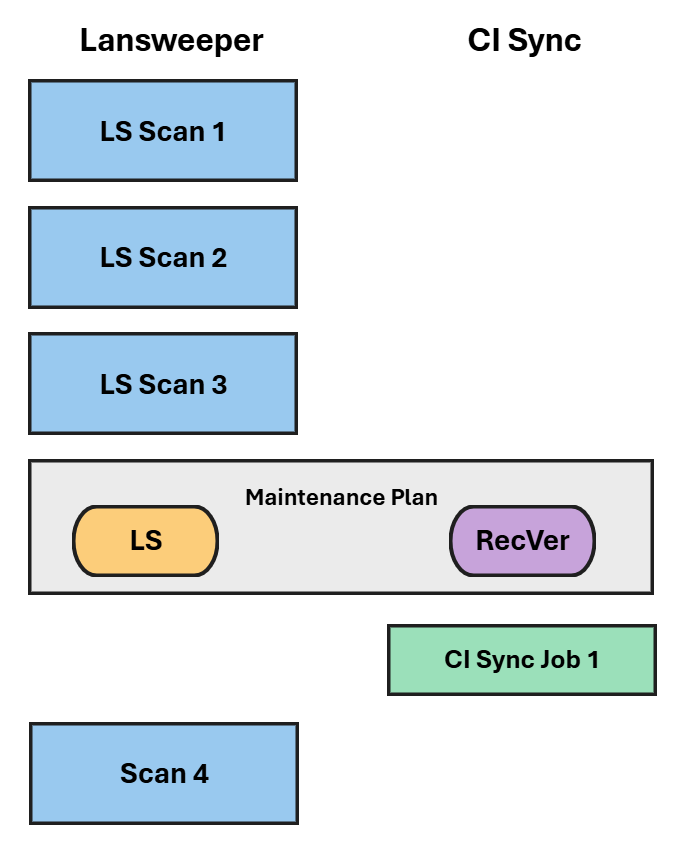
In most situations, running maintenance plans only takes a few minutes to perform but can make a big difference in performance!
5. Alternative processes are running whilst a CI Sync job is running
Check the start and end times for the Lansweeper scan jobs.
-
If Lansweeper scans overlap with scheduled CI Sync job times, consider moving the CI Sync job to another time. If it is possible, have a daily one-hour period where scans do not occur so that CI Sync can perform the daily delta sync to avoid contention.
-
If the Lansweeper jobs run constantly consider setting up a second snapshot of the Lansweeper database that CI Sync can read from - contact Syncfish support for advice on how this can be implemented.
-
If any other security scans or alternative server maintenance processes are running at the same time as CI Sync jobs, this may impact CI Sync performance.
6. The SQL Server is busy or having underlying performance issues
If the SQL Server instance is shared with other systems, verify that the SQL Server was not under load when the timeout occurred.
Engage your SQL DBA team to review SQL (or VM) performance metrics and SQL (or VM) errors.
Consider changing the schedule of the CI Sync job to a time when the SQL Server is not as busy or rebalance the other SQL Server workloads to reduce peak loads.
7. A query may need optimising
Each system has a different data profile that may affect query logic.
If none of the above reasons apply, raise a support ticket with Syncfish - we may need to provide you with some SQL Scripts to run to assist in profiling your data volume and return the results for analysis.
Raise a Support request via Syncfish Support for assistance.
Related articles
https://support.syncfish.com.au/cs/ckb050-how-to-setup-a-rebuild-index-maintenance-pl
Control Information
|
Created |
|
|---|---|
|
Reviewed |
|
|
Data Classification |
PUBLIC
|