
Rule Synopsis
The rule/s that control how CI Sync manages Display records in ServiceNow (i.e. Display CIs and the separate Display Asset records) based on the incoming data from Lansweeper On-Prem.
Important
As a reminder, CI Sync acts on the incoming data from Lansweeper. Therefore, Lansweeper’s behaviour directly impacts how CI Sync treats Displays in ServiceNow, which can be very important for customers performing Hardware Asset Management (HAM) functions for Displays within ServiceNow.
Syncfish strongly recommend customers read the Additional Information section further below on this page to learn about Lansweeper On-Prem and how it behaves with Displays.
Rule Details and Default
For existing Syncfish customers up to February 2026
-
By default, CI Sync treats Displays as a peripheral of the parent/main computer CI/Asset the Display is connected to. This has the following implications:
-
If Lansweeper no longer discovers a Display is Connected To a parent/main computer CI/Asset, then CI Sync will delete the Display CI (cmdb_ci_peripheral record) in ServiceNow.
-
If Lansweeper’s Last Seen rules delete a Display, then CI Sync will delete the Display CI (cmdb_ci_display_hardware record) in ServiceNow.
-
In both of the above cases, the deletion of the CI in ServiceNow will in most cases trigger a default behaviour in ServiceNow to delete the associated Hardware Assets (ALM_*) record.
-
The above behaviour (where CI Sync treats a Display like a peripheral) is the same as any other peripheral records (e.g. memory module records, network interface card records, storage device records and so on).
For NEW Syncfish customers from February 2026 and onwards
-
By default, CI Sync now treats Displays as standalone assets which means CI Sync relies solely on Lansweeper’s “Last Seen” behaviour to indicate the status and existence of a Display. This has the following implications:
-
If Lansweeper has not “seen” a Display for “n” number of days (where “n” is configured by customers within Lansweeper), then CI Sync will change the status of the CI/Asset record in ServiceNow to “retired”.
-
If Lansweeper has not “seen” a Display for an additional “n” days (again, where “n” is configured by customers within Lansweeper), then CI Sync will again change the status of the CI/Asset record in ServiceNow to “retired”.
-
In both of the above cases, CI Sync “retires” Displays using the ServiceNow Status attributes (i.e. Install Status, Operational Status, Hardware Status and Hardware Sub-Status).
-
The above status value behaviour is a standard feature of CI Sync in the way it utilises Lansweeper status values and Lansweeper Last Seen behaviour for all other parent/main CIs and Assets in ServiceNow.
You can read more about the standard Last Seen behaviour of Lansweeper (and how CI Sync uses the outcome of Lansweeper’s Last Seen functionality) on this page: Rule 6 - The use of Lansweeper On-Prem “not seen” and deleted records to update ServiceNow Status Values.
And, you can read more about the standard Status Value transform behaviour of CI Sync on this page: Rule 5 - Mapping of Lansweeper On-Prem Status Values to ServiceNow Status Values.
Override Options
Context
For existing Syncfish customers up to February 2026
-
Customers may consider overriding this rule if they want to use the new CI Sync position established in February 2026. That is, if customers want CI Sync to treat Displays as a standalone asset rather than as a peripheral.
For NEW Syncfish customers from February 2026 and onwards
-
Customers may consider overriding this rule if they want to use the old/original CI Sync position. That is, if customers want CI Sync to treat Displays as a peripheral of computer CI/assets rather than as a standalone asset. If customers from February onwards override this setting, be aware this will cause CI Sync to delete the Display CI and associated Asset record in ServiceNow as soon as either Lansweeper no longer discovers the Display in a Connected To state with a parent/main computer CI/Asset, OR Lansweeper's Last Seen rules kick-in.
Options
For existing Syncfish customers up to the end of January 2026
-
The rule can be amended so that customers can use the new CI Sync position established in February 2026. That is, if customers want CI Sync to treat Displays as a standalone asset rather than as a peripheral.
For NEW Syncfish customers from February 2026 and onwards
-
The rule can be amended so that customers can revert to the old/original CI Sync position. That is, if customers want CI Sync to treat Displays as a peripheral of computer CI/assets rather than as a standalone asset.
Syncfish generally recommend not overriding this setting for new customers of CI Sync.
Overriding via Connection Settings
Customers can perform the override using a “Connection Setting” via the CI Sync User Interface (i.e. customers can perform the overrides themselves). Additional information for this is available via the following documentation:
-
For a general overview of CI Sync Connection Settings please read Understanding the use of CI Sync Connection Settings.
-
For the specific CI Sync Connection Setting/s related to the rule described on this page please read Synchronize Displays as Peripherals for Lansweeper On-Prem Connector Applicability.
For documentation on all CI Sync Connection Settings please visit the page tree Connection Setting Guides.
Additional Information
Context
Modern Displays are often expensive, both individually and in the aggregate across an organisation. As such, Syncfish recognises customers may treat their fleet of displays as having material value (i.e. may treat Displays as a capital asset, rather than a computer expense).
In addition to the default rules/behaviours of CI Sync (documented above on this page), Syncfish believe customers may also benefit from understanding Lansweeper’s “Last Seen” behaviour, including how customers may want to override Lansweeper’s behaviour solely for Displays.
The following information is provided by Syncfish based on documentation obtained from Lansweeper. The information is provided by Syncfish on a goodwill basis. Customers should contact Lansweeper for further information on this topics in case the following documentation has changed or become inaccurate over time.
Explanation of Lansweeper “Last Seen” behaviour and overriding this behaviour in Lansweeper itself
Lansweeper has two important concepts for this overall topic:
-
Assets in Lansweeper have a Status value. These are values such as Active, Inactive, Sold, Stolen and so on.
-
Lansweeper has the concept of "Last Seen" (i.e. when was a device “last seen” by Lansweeper Discovery. Of Note:
-
Within Lansweeper Last Seen should be interpreted as “Last Seen in the network”. That is, Lansweeper will check multiple fields to confirm whether the device is really inactive (like Last Seen, Last Active Scan, Last IP Range Scan, and possible more).
-
Lansweeper “Last Seen” rules determine when Lansweeper automatically change the status of an Asset to “Inactive” (i.e. “Set assets to non-active if not seen in the last “n” days”).
-
Lansweeper “Last Seen” rules also determine when Lansweeper automatically (and permanently) deletes an Asset (i.e. Permanently delete assets if not seen in the last “n” days).
-
The above “Last Seen” rules are set within the Lansweeper Admin UI.
-
The challenge with Displays is they are typically only “seen” by Lansweeper when Connected To a main/parent asset (i.e. connected to a computer). When a Display is connected to a Computer, Lansweeper discovers the Display via WMI calls to the Computer. That is, Lansweeper doesn’t directly discover the Display, it discovers the Display because it was connected to a computer when Lansweeper discovered and queried the computer itself.
This means the concept of “Last Seen” is slightly different for Displays. This is important because of the following:
-
Firstly, CI Sync utilises the Lansweeper Status values to drive how CI Sync manipulates CI records in ServiceNow. For example, when a Lansweeper Asset becomes Inactive, CI Sync retires the CI in ServiceNow. And, when Lansweeper permanently deletes an Asset, CI Sync also retires the CI in ServiceNow (unless the Lansweeper record is deemed a peripheral by CI Sync in which case CI Sync physically deletes the CI in ServiceNow).
-
Secondly, Displays might be connected to a computer one day, and not connected to a computer for many subsequent days (e.g. when someone leaves an organisation, their Display may sit on a desk or in a store room for an extended period of time). It is in this situation Lansweeper’s Last Seen and Status values can cause CI Sync to update CIs in ServiceNow in a way that customers may not want.
The documentation on this page (i.e. further up in this page about the default behaviour of CI Sync) explains what CI Sync does to CIs in ServiceNow under various circumstances, including how CI Sync rules behave depending on whether a customer wants CI Sync to treat Displays as a peripheral or as a standalone asset.
What customers may not be aware of is their ability to override Lansweeper’s Last Seen behaviour specifically for Displays.
Lansweeper uses the term “cleanup” rules to represent the internal process of either (a) updating the status value of assets Not Seen for “n” days, and/or (b) deleting assets Not Seen for “n” more days.
Using the Lansweeper UI, customers can exclude assets from Lansweeper’s cleanup rules. Customers can exclude assets from the cleanup rules using the following options:
-
You can run a scheduled task on the database that enables this for Displays only by setting the tblAssetCustom.PreventCleanup field to 1.
-
Customers can also edit a single asset or using the bulk edit option in the UI
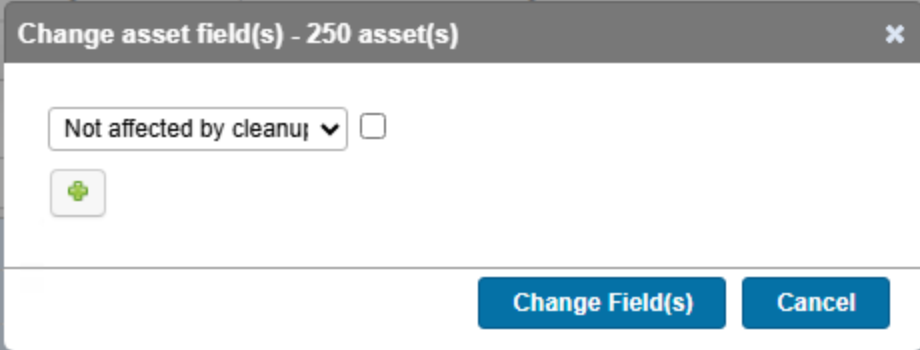
Once a Display (or any other asset) has been excluded from the cleanup rules, you can confirm by looking at the individual asset in the Lansweeper UI (see below).
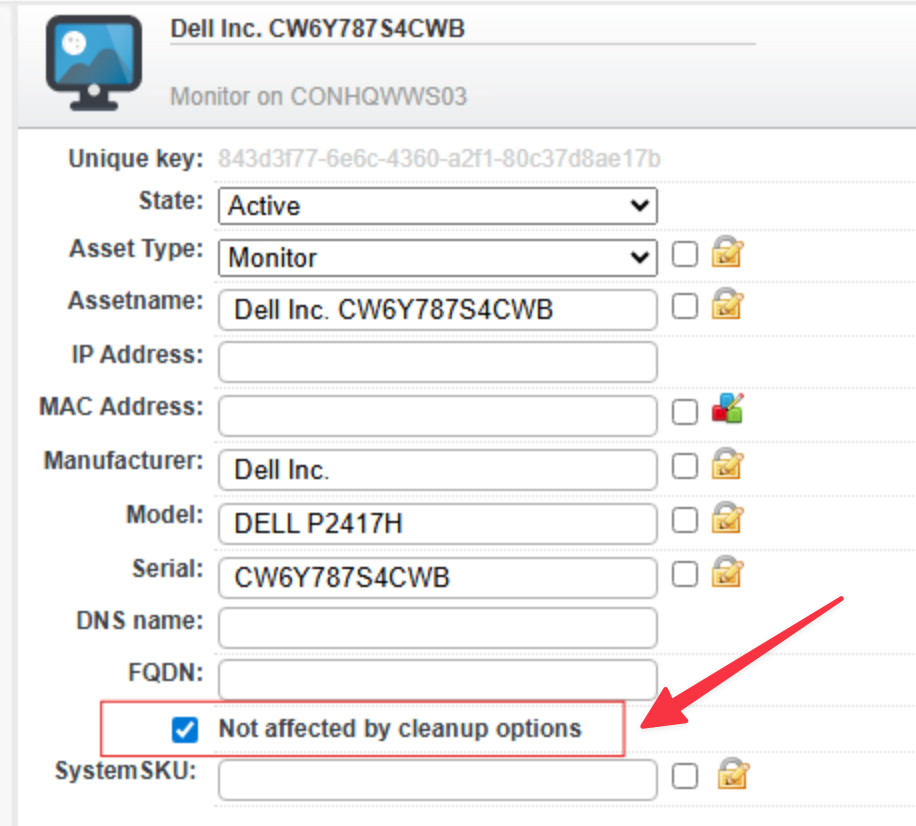
By overriding the cleanup rules for Displays, customers can in turn influence how CI Sync manipulates CI records (and as a result the Asset records) in ServiceNow.
Related Rules
N/A