
Rule Synopsis
These are the rule/s that control the list of Windows Services that CI Sync synchronizes from Lansweeper Windows Servers and Windows PCs to the related CI in ServiceNow.
Note: These rule/s are only applicable to customers subscribed to CI Sync Enterprise Edition.
Rule Details and Default
-
By default, there no list of Windows Services for CI Sync to use (when customers select “Windows Services” as part of the scope of a sync job that includes Windows Servers or Windows PCs).
Override Options
Context
Customers must use this setting to define the list of Windows Services they want CI Sync to read from the source Lansweeper Servers and PCs and sync’d to the related CI in ServiceNow.
Options
-
The rule must be overridden to include a list of Windows Services they want CI Sync to read from the source Lansweeper Servers and PCs and sync’d to the related CI in ServiceNow.Additional Information
Overriding via Connection Settings
N/A
Additional Information
-
This rule is only applicable to CI Sync Enterprise Edition (it does not apply to CI Sync Professional Edition as Pro edition does not allow sync’ing of Windows Services).
-
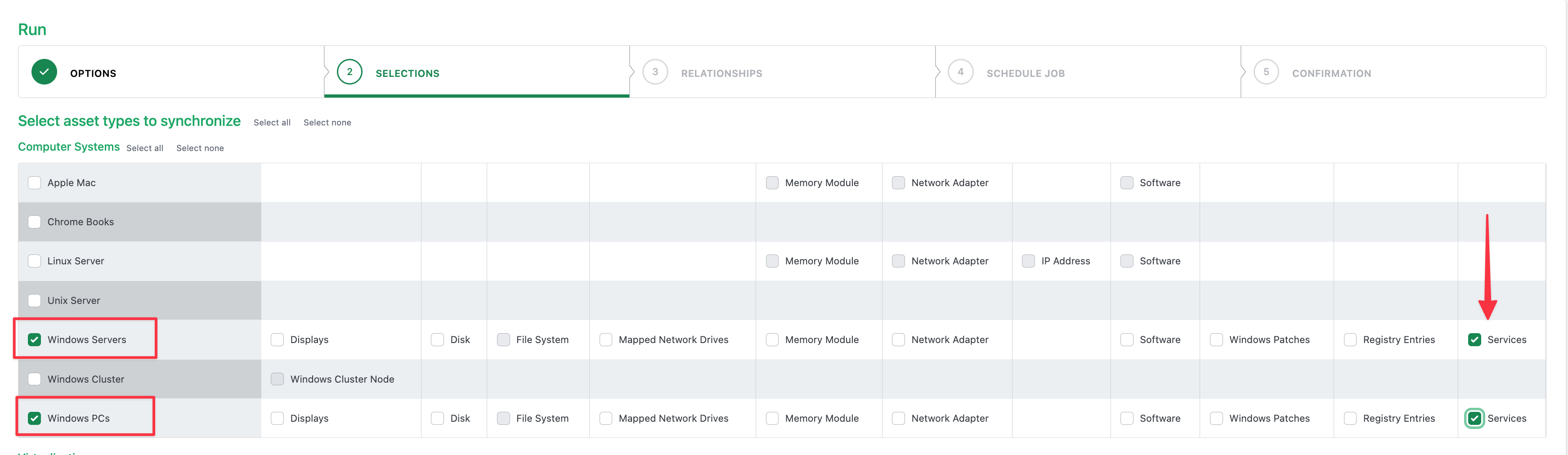
The rule is applied only when customers select “Windows Services” as part of the scope of a sync job that includes Windows Servers or Windows PCs (as shown in the screen shot below).
Related Rules
N/A
Support Model for Rule Overrides
Question: Can overrides be performed by customers without a Syncfish Extended Implementation and Support Plan?
Answer: Yes (via self-service in the CI Sync UI)
Question: Which Syncfish Extended Implementation and Support Plan is required to obtain overrides of this rule
Answer: Either a Bronze Plan, Silver Plan or Gold Plan (for customers wanting Syncfish assistance to perform overrides of this rule)