
Rule Synopsis
These are the rule/s that control how CI Sync interacts with the following data elements in ServiceNow:
-
How CI Sync interacts at a record level with the cmdb_ci_spkg table
-
How CI Sync interacts at a record level with the cmdb_software_instance table
-
How CI Sync interacts at a attribute level, specifically the “Install Count” attribute on the cmdb_ci_spkg table.
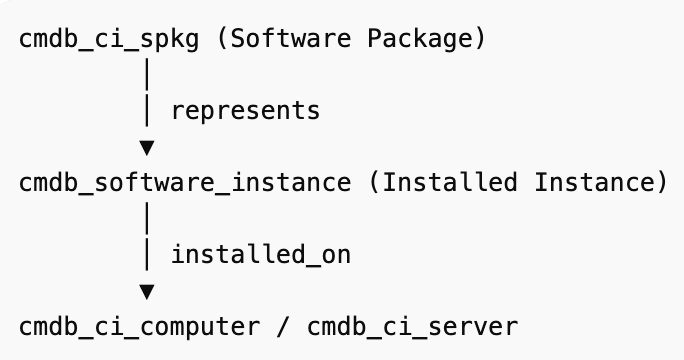
For ease of reference, the relationship between the various tables is shown below.
Rule Details and Default
Customers can decide to include Installed Software when creating and running a CI Sync Job. Installed Software is included via the Step 2 Selections page in the CI Sync Web UI (see below).
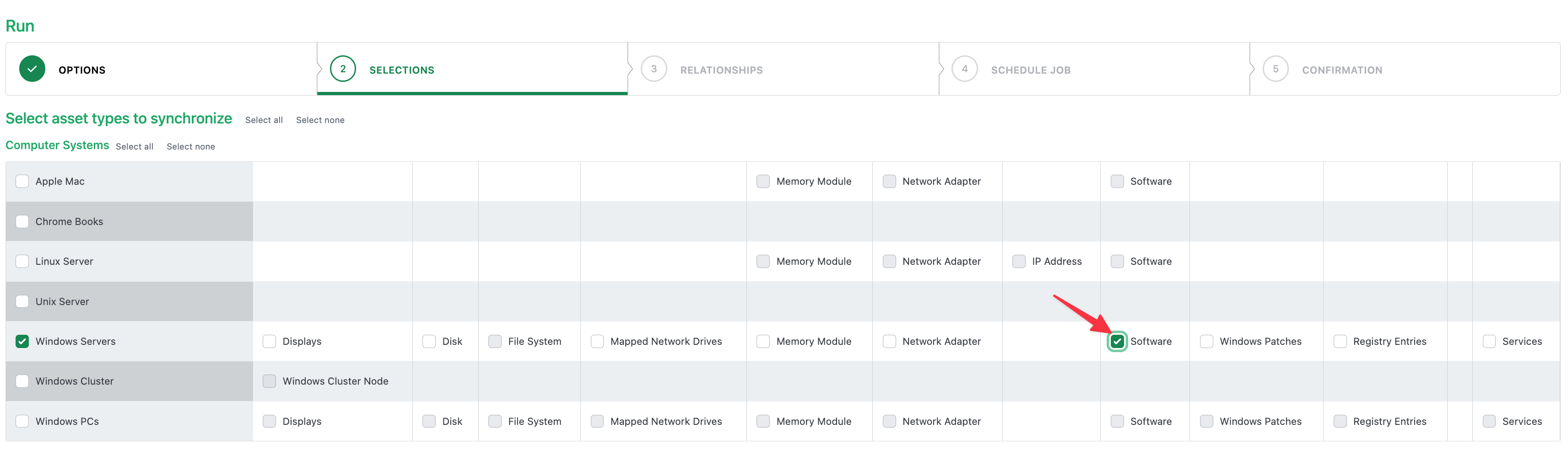
If Installed Software is selected in a sync job, CI Sync interacts with the tables outlined below.
-
The cmdb_ci_spkg table
-
Table Purpose: In ServiceNow this table represents the software product or package itself, independent of where it is installed.
-
CI Sync behaviours:
-
CI Sync does create a new software package record if CI Sync inserts a new software instance record (in the cmdb_software_instance table explained below) and there is no existing software package for the new software instance.
-
CI Sync does not delete records from the cmdb_ci_spkg table. Instead, CI Sync retires records in the cmdb_ci_spkg table if CI Sync has removed the last remaining software instance from the cmdb_software_instance table (which is explained below).
-
CI Sync does not directly modify the “Install Count” attribute in the cmdb_ci_spkg table. Instead, ServiceNow has sole responsibility for managing the “Install Count” attribute. See the “Additional Information” section below for more information about ServiceNow’s use of the “Install Count” attribute.
-
-
-
The cmdb_software_instance table
-
Table Purpose: In ServiceNow this table represents a specific installation of software on a specific device/CI.
-
CI Sync behaviours:
-
CI Sync does create new software instance records for all of the installed software records on a given IT asset in the source system.
-
CI Sync does delete existing software instance records if the related software/application has been removed from the IT asset in the source system (e.g. if a piece of software has been removed from a windows server, then CI Sync will delete the software from the cmd_software_instance table for the related CI).
-
None of the above behaviours impact the “Installed Count” attribute on the cmdb_ci_spkg table, because that attribute is managed solely by ServiceNow itself. See the “Additional Information” section below for more information about ServiceNow’s use of the “Install Count” attribute.
-
-
Override Options
N/A
Overriding via Connection Settings
Not Available - Requires a Custom Data Sync Rule (and therefore a Syncfish Support Plan to modify the default behaviour)
Additional Information
The following is offered by Syncfish to explain ServiceNow’s behaviour for the “Install Count” attribute in the cmdb_ci_spkg table. Customers should contact ServiceNow directly for further information.
-
This count value is aggregated by ServiceNow as part of periodic processes.
-
As per ServiceNow KB1564558 ‘In the Software Package<cmdb_ci_spkg> table the field "Install count" and a Related list "Installed on" are synced using a Scheduled Job(Count Software Licenses).’
-
ServiceNow have provided a direct link to the scheduled job noted above via https://<instancename>.service-now.com/sys_trigger_list.do?sysparm_query=sys_idSTARTSWITHddabbfc70a0a0b1500d9ee9973fe0bc4
-
There are no real-time updates performed on Software Package Install Count either - this would cause a performance impact if every update to Software Installations triggered metric updating.
-
There are script libraries within ServiceNow that can be leveraged to periodically update the Install Count, and these should typically be triggered by background maintenance scripts via scheduled jobs or a similar mechanism.
Related Rules
N/A