
This page shows examples of several User Oriented attributes when processed by CI Sync. The default rule and rule override options are explained in Rule 20 - Synchronization of a Lansweeper Cloud User Oriented Attribute for Assigned_To in ServiceNow.
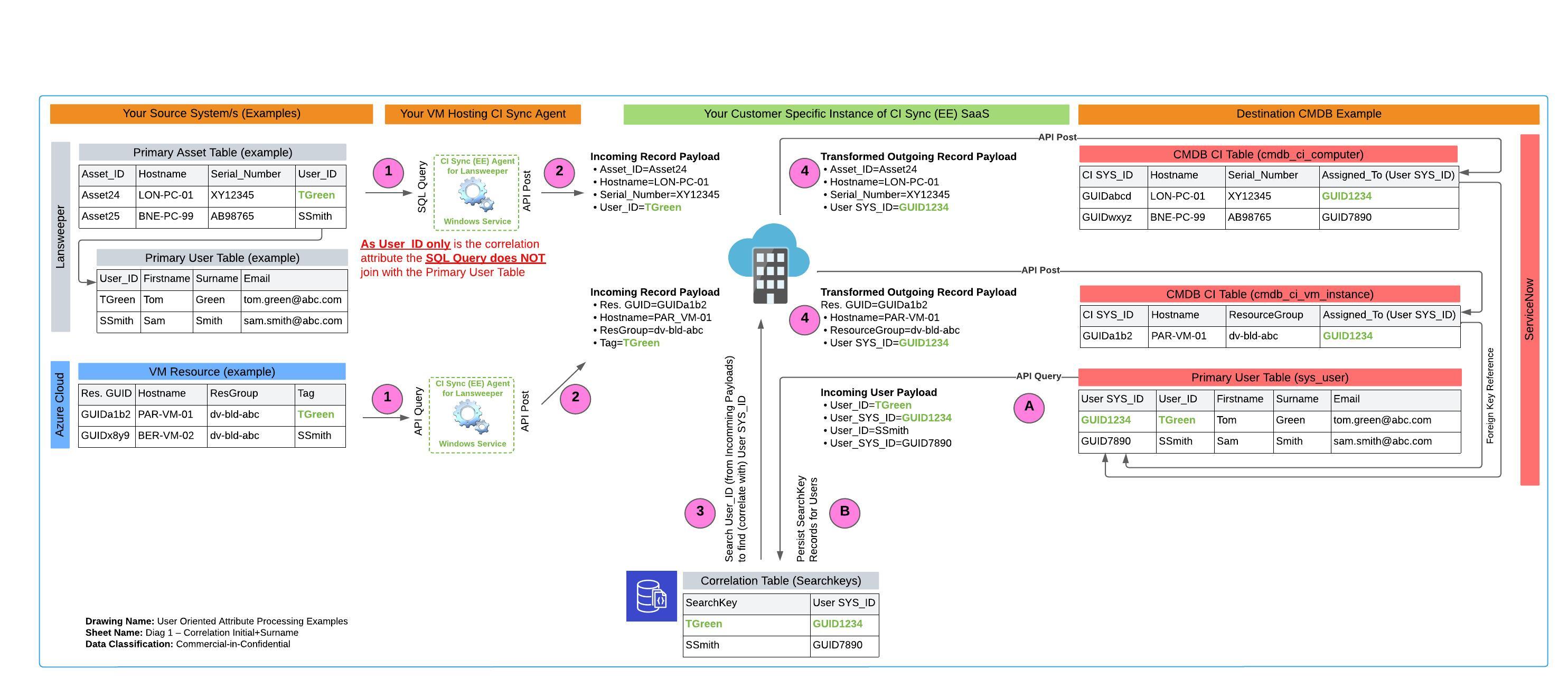
Example 1: Last Logged on User contains First Initial + Surname
Diagrammatic View
Dataflow Trace
Use the diagram above and table below to trace the bold/green TGreen value (and subsequently it’s GUID1234 SYS_ID value) on the diagram to see how it is processed by CI Sync.
|
Ref |
Explanation |
|
A |
At the start of each synchronization job, your customer specific CI Sync SaaS instance queries the sys_user table in ServiceNow. CI Sync only queries two values: (1) The agreed correlation attribute (in the above diagram this is the value in the User_ID field), and (2) the SYS_ID value. |
|
B |
CI Sync persists the two values in your customer specific SearchKey database (a MongoDB database which is a part of your customer specific CI Sync SaaS instance). |
|
1 |
The CI Sync Agent (windows service) queries the primary asset/resource table from the Source System. The query does not extend into any other tables if the agreed correlation attribute is entirely contained in the primary asset/resource table (as per the example in the diagram which shows that “TGreen” is all that is required to correlate against the values held in the SearchKey database thanks to steps (A) and (B) above). |
|
2 |
The CI Sync Agent sends the record payload to your CI Sync SaaS instance. The payload contains the asset/resource attributes/values and the user correlation attribute/value (i.e. “TGreen”). |
|
3 |
Logic in your CI Sync SaaS instance checks your MongoDB SearchKey table and finds a match on “TGreen”). CI Sync now knows the ServiceNow SYS_ID for the user “TGreen” (the pretend SYS_ID in the above example is “GUID1234”). |
|
4 |
The CI Sync SaaS code creates an ongoing record payload which now only contains the SYS_ID (i.e. “GUID1234”). CI Sync updates the relevant CMDB_CI table with the asset/record attributes/values in addition it sets the Assigned_To field with the SYS_ID of the user (i.e. “GUID1234”) as the foreign key reference to the SYS_USER table. |
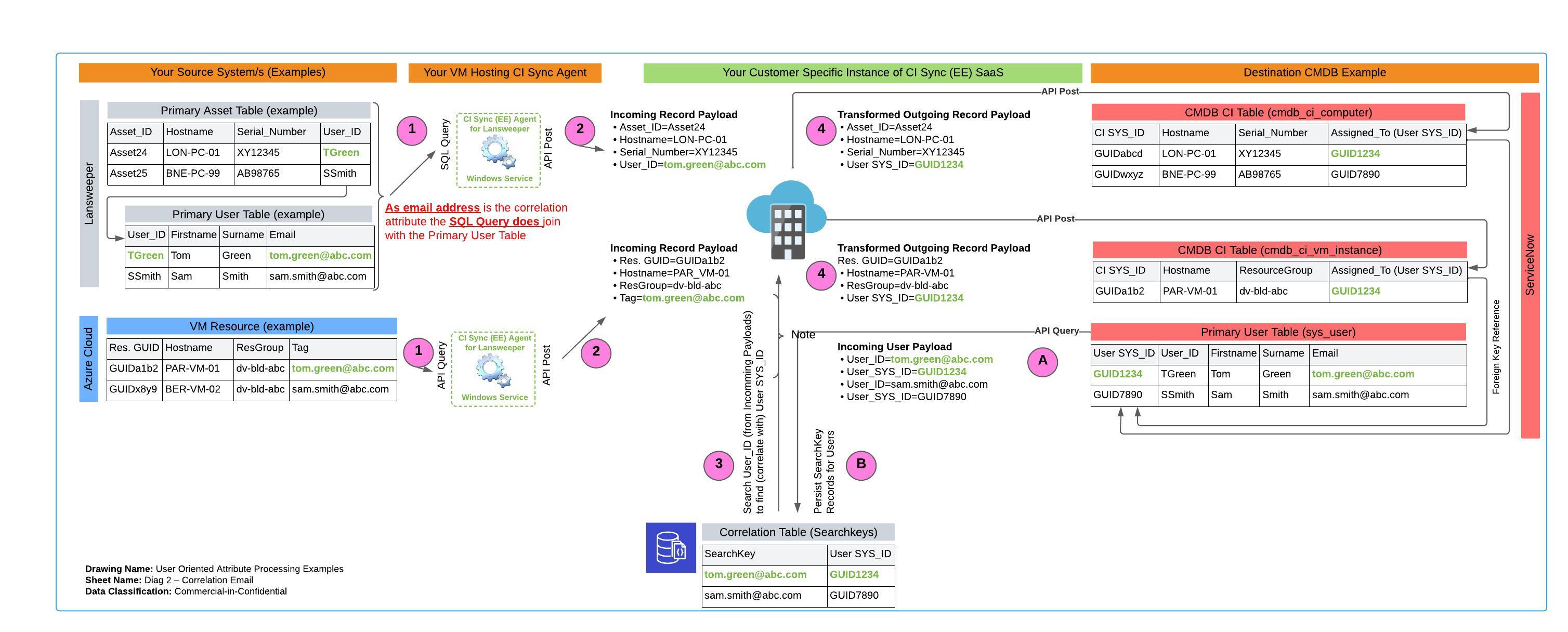
Example 2: Last Logged on User contains Email Address based on First Name + Surname
Diagrammatic View
Dataflow Trace
Use the diagram above and table below to trace the bold/green tom.green@abc.com value (and subsequently it’s GUID1234 SYS_ID value) on the diagram to see how it is processed by CI Sync.
|
Ref |
Explanation |
|
A |
At the start of each synchronization job, your customer specific CI Sync SaaS instance queries the sys_user table in ServiceNow. CI Sync only queries two values: (1) The agreed correlation attribute (in the above diagram this is the value in the Email Address field), and (2) the SYS_ID value. |
|
B |
CI Sync persists the two values in your customer specific SearchKey database (a MongoDB database which is a part of your customer specific CI Sync SaaS instance). |
|
1 |
The CI Sync Agent (windows service) queries the primary asset/resource table from the Source System. The query needs to join/extend into the primary user table as the agreed correlation attribute is not contained in the primary asset/resource table. The diagram shows the CI Sync query joins the tables on the common key (“User_ID”) to it can return value “tom.green@abc.com”) which what will ultimately be needed to correlate against the values held in the SearchKey database thanks to steps (A) and (B) above). |
|
2 |
The CI Sync Agent sends the record payload to your CI Sync SaaS instance. The payload contains the asset/resource attributes/values and the user correlation attribute/value (i.e. “tom.green@abc.com”). |
|
3 |
Logic in your CI Sync SaaS instance checks your MongoDB SearchKey table and finds a match on “tom.green@abc.com”). CI Sync now knows the ServiceNow SYS_ID for the user “tom.green@abc.com” (the pretend SYS_ID in the above example is “GUID1234”). |
|
4 |
The CI Sync SaaS code creates an ongoing record payload which now only contains the SYS_ID (i.e. “GUID1234”). CI Sync updates the relevant CMDB_CI table with the asset/record attributes/values in addition it sets the Assigned_To field with the SYS_ID of the user (i.e. “GUID1234”) as the foreign key reference to the SYS_USER table. |