
Rule Synopsis
These are the rule/s that control whether CI Sync synchronizes a User Oriented custom attribute from VMware to set one or more of the following attributes on each CI record.
-
Owned_By
-
Assigned_To
-
Managed_By
-
Supported_By
This rule also controls which ServiceNow sys_user attribute (or attributes) are used to correlate the incoming values from the VMware User Oriented values.
Rule Details and Default
-
By default, CI Synchronizer does not synchronize any User Oriented custom attributes from VMware to one or more of the noted user oriented attributes on each CI record.
Override Options
Context
Customers may consider overriding this rule so that CI Synchronizer does synchronize one or more User Oriented custom attributes in VMware to one or more of the noted user oriented attributes on each CI record.
If this rule is overridden (to cause CI Sync to synchronize one or more User Oriented custom attributes in VMware), customers can further influence the behaviour by controlling the following:
-
Which custom attributes (including multiples) are read by CI Sync
-
Which ServiceNow sys_user attribute (or attributes) are used to correlate the incoming values from the VMware User Oriented values.
Options
-
This Data Sync Rule can be overridden so that CI Synchronizer does synchronize one or more User Oriented custom attributes in VMware to one or more of the noted user oriented attributes on each CI record.
-
If this rule is overridden (to cause CI Sync to synchronize one or more User Oriented custom attributes in VMware), customers can further influence the behaviour by controlling the following:
-
Which custom attributes (including multiples) are read by CI Sync
-
Which ServiceNow sys_user attribute (or attributes) are used to correlate the incoming values from the VMware User Oriented values.
-
Overriding via Connection Settings
Customers can perform the override using a “Connection Setting” via the CI Sync User Interface (i.e. customers can perform the overrides themselves). Additional information for this is available via the following documentation:
-
For a general overview of CI Sync Connection Settings please read Understanding the use of CI Sync Connection Settings.
-
For the specific CI Sync Connection Setting/s related to the rule described on this page please read each of the following:
-
Custom Attribute Synchronization for Owned By for VMware vSphere
-
Custom Attribute Synchronization for Assigned To for VMware vSphere
-
Custom Attribute Synchronization for Managed By for VMware vSphere
-
Custom Attribute Synchronization for Supported By for VMware vSphere
-
Define a User oriented attribute when using User Synchronization from a Source System in ServiceNow
-
For documentation on all CI Sync Connection Settings please visit the page tree Connection Setting Guides.
Additional Information
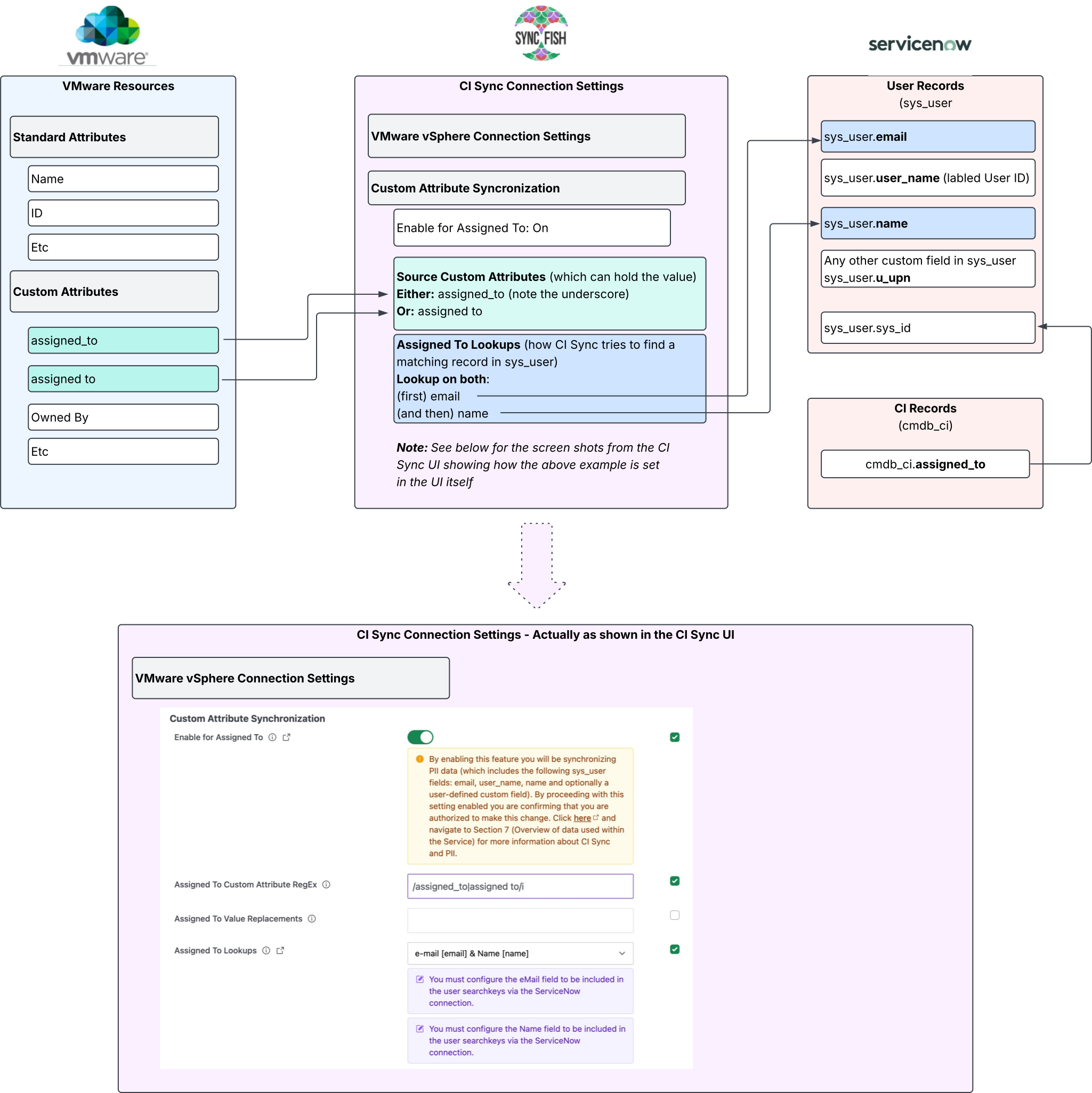
The following diagram shows an example of the CI Sync behaviour to read one a user oriented custom attribute and match to a corresponding attribute in ServiceNow’s sys_user table for the purpose of setting the cmdb_ci.assigned_to as a reference back to the sys_user table. The same approach can be used for other custom attributes and other ServiceNow user oriented attributes such as owned_by, etc.
Related Rules
N/A