
Connector Applicability
|
Applies to Source Connectors |
|
|---|---|
|
Applies to Destination Connectors |
ServiceNow |
Assumptions
These instructions assume you have already setup a source connection in CI Sync for ServiceNow.
Pre-Read
Syncfish recommend customers read the following documentation before changing the Connection Setting/s described below.
Locating and Amending the Connection Setting in the CI Sync UI
-
Navigate to the Settings page
-
Under the Destination Connections heading (list), locate your ServiceNow connection (it will be either a Non-PROD “TEST” connection or the “PROD” connection depending on which one you need to amend).
-
Click the Update link on the right-hand side of the ServiceNow connection.
-
Scroll down and locate the Additional Settings Heading and view the Individual Connection Setting related to this guide.
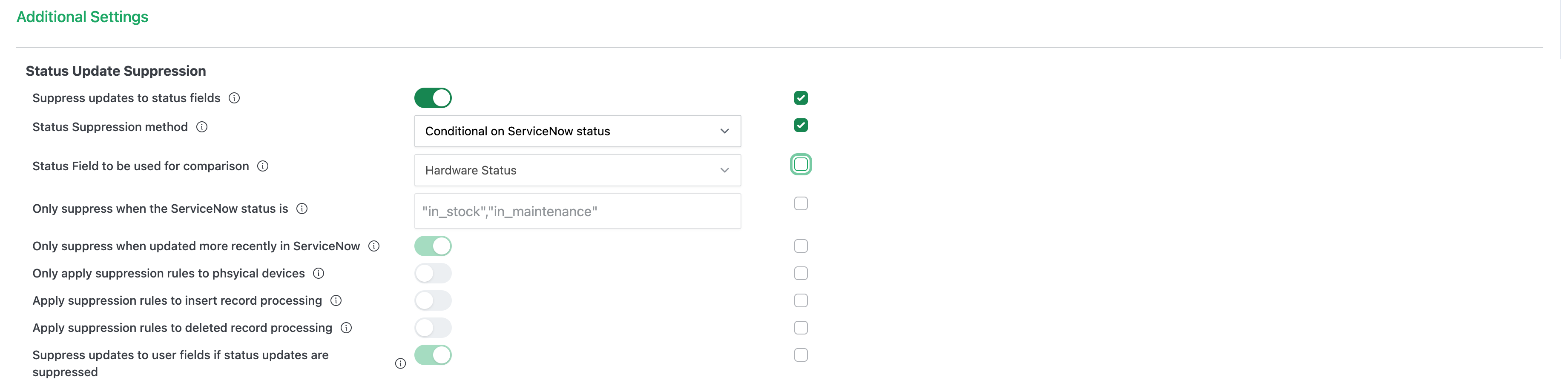
The screen shot is provided only as sample to assist when reading this page. The state of your own CI Sync UI will depend on whether you are starting from the CI Sync default position or if you have already amended one/more of the settings.
-
Tick the Override default box/boxes and then use the sliders related to the individual settings.
-
The following table elaborates any further information about these particular settings.
|
Setting |
Type |
Additional Notes |
|
Suppress updates to status fields |
Slider |
When enabled, CI Sync will suppress updates to the following four (4) status values on CMDB CI records in ServiceNow based on the subsequent settings defined in the rows further below.
|
|
Status Suppression method |
Choicelist |
This setting informs CI Sync under which conditions CI Sync should (or should not) suppress Status Value updates. The choices for this setting are:
|
|
Status Field to be used for comparison |
Choicelist |
This setting controls which Status attribute (on the CI record) CI Sync uses when comparing an existing Status Value to determine whether to update the Status Values or not. The choices for this setting are:
This setting works in conjunction with the setting below called “Only suppress when the ServiceNow status is [currently]”. |
|
Only suppress when the ServiceNow status is [currently] |
String |
This setting defines which existing value (or values), on the attribute defined in the prior setting, will cause CI Sync to not update the four (4) statue values. For example: If this setting contains “in_stock”,”in_maintenance”, CI Sync will not update the four (4) CI Status Values for those CI Sync that are currently “in_stock” or “in_maintenance”. |
|
Only suppress when [the status has been] updated more recently in ServiceNow |
Slider |
This setting causes CI Sync to not update four (4) statue values if the CI in ServiceNow has been updated more recently than the source system record. For example, if a CI record has been updated more recently than the corresponding asset/device record in InTune, or Lansweeper etc, then CI Sync will not update the four (4) CI Status Values. This would be useful when a person (e.g. a local IT support person has manually updated the status of a CI and does not want any automation from CI Sync to overwrite the status). |
|
Only apply suppression rules to physical devices |
Slider |
This setting causes CI Sync to only apply the above rules to physical devices (as distinct from virtual devices/resources). |
|
Apply suppression rules to insert record processing |
Slider |
This setting causes CI Sync to only apply the above rules to CI Insert operations (rather than to CI Update operations). Note: If the prior setting called “Only suppress when [the status has been] updated more recently in ServiceNow” has been enabled, the evaluation of this setting is ignored. |
|
Apply suppression rules to delete record processing |
Slider |
If enabled, when a record detected as deleted from the source system, the Status Update Suppression settings will be applied when processing the deletion (retirement) event. Enabling this setting will typically prevent CI Sync from automatically setting CIs to Retired. Note: If the prior setting called “Only suppress when [the status has been] updated more recently in ServiceNow” has been enabled, the evaluation of this setting is ignored. |
|
Suppress updates to user fields if status updates are suppressed |
Slides |
If enabled, CI Sync will also not update the Assigned_To attribute on CIs (i.e. changes to a user assigned in the source system will not be reflected on CIs in the CMDB). |
-
After modifying the settings, scroll to the bottom of the page, tick the “I consent…” checkbox and finally click the Save connection button.
-
You can now run a sync job and the amended settings will be applied causing the CI Sync Data Sync rules to be modified accordingly.
Importantly
Make sure you consciously override the setting against either your TEST or PROD environment (i.e. your TEST vs PROD sync jobs).
For more information on how to use TEST vs PROD Connection Settings please read Understanding the use of CI Sync Connection Settings.
Syncfish strongly recommend making changes for TEST environment/sync jobs first. Only modify PROD related settings after thoroughly validating the intended results in TEST.