
Rule Synopsis
The API for MS Defender for Endpoint returns limited attributes about each endpoint device. For example:
-
The API does not return Manufacturer or Model information for each device record.
-
The API does return Operting System and Operating System Version, however customers may notice the quality of these attributes are better in Entra ID than in MS Defender for Endpoint
To compensate for this, CI Sync provides an option for customers to enrich the Defender for Endpoint device data (payloads) with attribute data from Entra ID. Note: This only works for devices that are AAD enrolled.
Rule Details
-
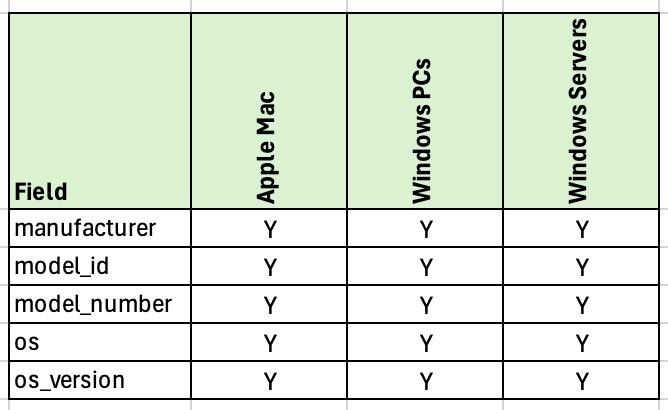
By default, CI Sync does not read the Manufacturer or Model attributes shown in the table below from MS Defender for Endpoint (because the API does not return these attributes). Therefore CIs in the CMDB will not contain data in those attributes.
-
By default, CI Sync does read the Operting System and Operating System Version from the MS Defender for Endpoint API (and therefore populates CIs in the CMDB with the data in those attributes from MS Defender for Endpoint).
Override Options
Context
Customers may consider using data in Entra ID, for the attributes shown in the above table, to populate CIs in the CMDB.
Options
-
Customers can turn on (i.e. override the default behaviour) to instruct CI Sync to populate the attributes from Entra ID.
-
Customers can further influence CI Sync for each attribute shown in the table above. That is:
-
Customers can enrich the Manufacturer only.
-
Customers can enrich the Model ID and Model Number only.
-
Customers can enrich the OS only.
-
Customers can enrich the OS Version only.
-
Or customers can enrich any combination of the above attributes.
-
Overriding via Connection Settings
Customers can perform the override using a “Connection Setting” via the CI Sync User Interface (i.e. customers can perform the overrides themselves). Additional information for this is available via the following documentation:
-
For a general overview of CI Sync Connection Settings please read Understanding the use of CI Sync Connection Settings.
-
For the specific CI Sync Connection Setting/s related to the rule described on this page please read Enrich Defender for Endpoint Device Payloads from Entra ID.
For documentation on all CI Sync Connection Settings please visit the page tree Connection Setting Guides.
Additional Information
N/A