
Rule Synopsis
These are the rule/s that determine how MS Defender for Endpoint Attributes/Fields are mapped to CMDB CI Attributes/Fields for each type of Endpoint Asset.
Rule Details and Default
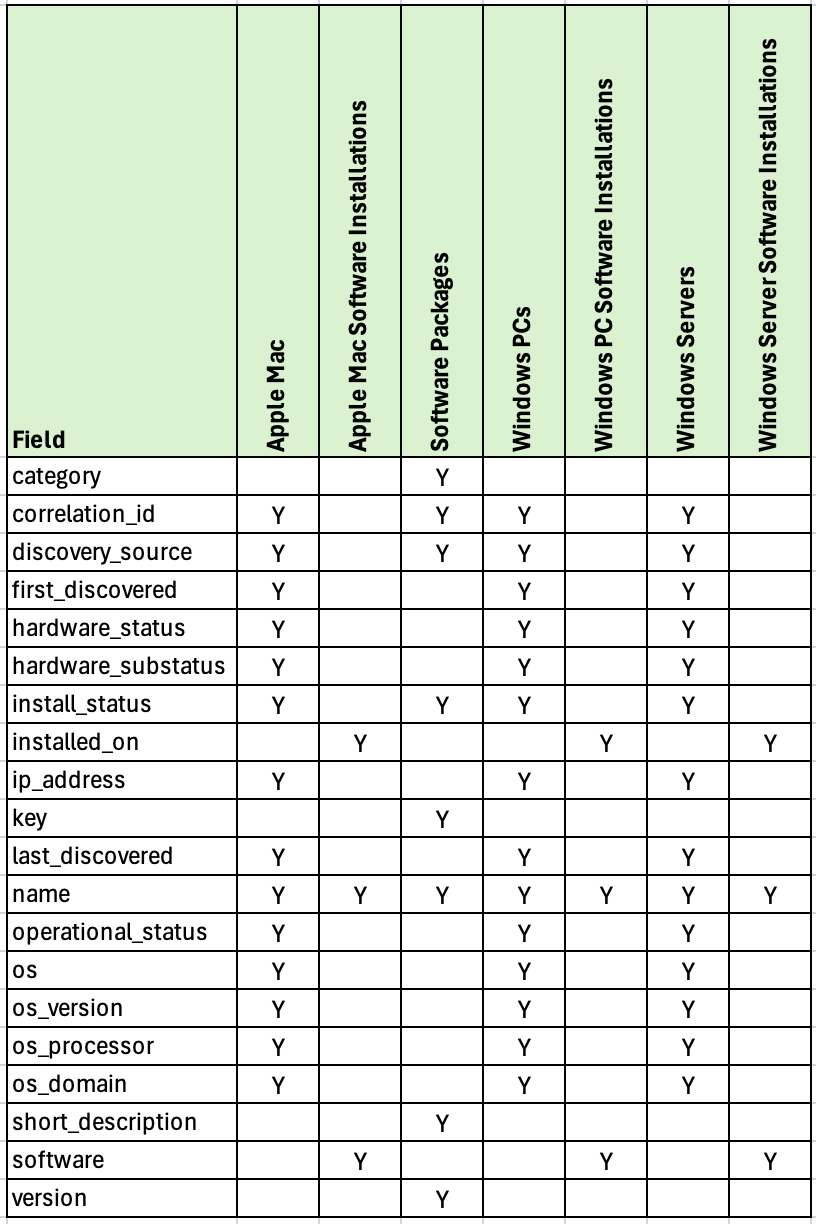
Please read the table below which show the default attribute mappings.
Due to the large number of fields per Asset Type (at the source) and attributes per CI (at the destination) the table below only shows the destination attributes per CI Class. Please contact Syncfish if you further information beyond what’s shown below.
Override Options
Context
Customers may consider two types of overrides as explained in the Options section below. For Option 1 (Custom Field Overrides), customers need to engage Syncfish to discuss the implications of changing the default attribute/field level mappings.
This is because the attributes/fields available in ServiceNow are specific to target CI Table/Class (based on the CI Class inheritance model baked into the ServiceNow CMDB. Customers wishing to amend the attribute/field level mappings may have broader implications on the target CI Table/Class used for a given MS Defender for Endpoint Asset type.
Options
-
Custom Field Overrides. The field mappings (and transformation of data for persistence into the destination fields) can be amended for each MS Defender for Endpoint Asset Type.
-
Entra ID Device Data Enrichment. Customers may wish to enrich the attributes on each asset with data available in Microsoft Entra ID. For information on this option please refer to MS Defender for Endpoint Rule: Rule 10 - Enrich Defender for Endpoint Device Data (Payloads) from Entra ID.
Overriding via Connection Settings
Not Available - Requires a Custom Data Sync Rule (and therefore a Syncfish Support Plan to modify the default behaviour)
Additional Information
N/A