
Aim
Syncfish are updating the design of CI Sync to use Workload Identify Federation as an optional/additional authentication method for GCP (i.e. in addition to the Shared Secret authentication method currently offered by CI Sync).
This page contains information about the design so it can be socialised with prospective customers of CI Sync.
The information on this page is subject to change is not an authoritative position on this topic.
Components Overview
This section outlines the components involved for Workload Identity Federation between the customer’s GCP and CI Sync instances.
Diagram
Click the diagram to render full screen
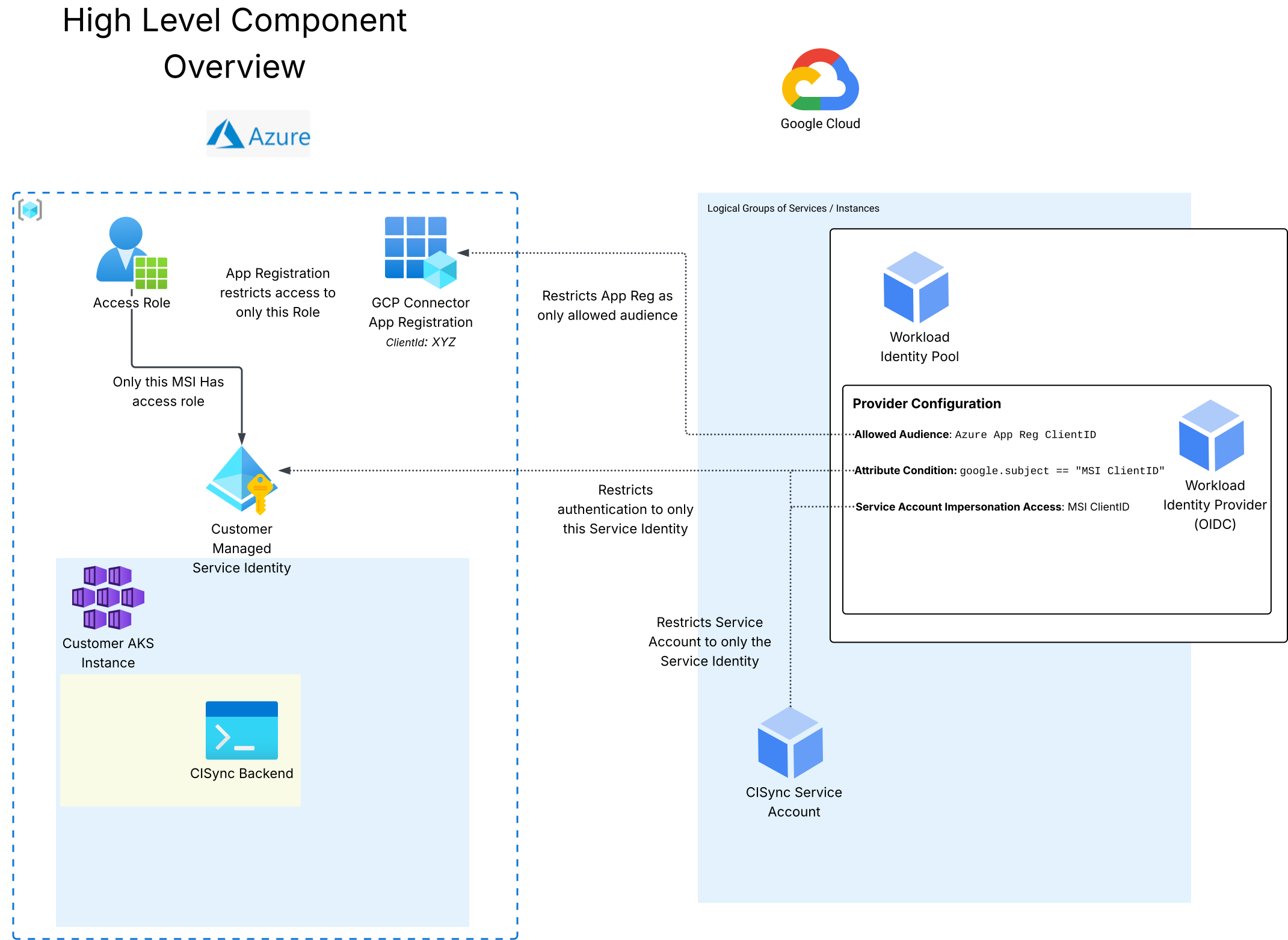
(From Lucidcharts under Products > CI Sync (EE) > GCP Authentication)
Overview
CI Sync - Setup
The following will be performed by Syncfish on a per-customer basis via an automated process:
-
NB: There is already an existing customer-specific Managed Service Identity (MSI) which is used as the identity to execute the code for the CI Sync customer instance.
-
A customer-specific App Registration will be created in the CI Sync Azure Entra ID specifically for authenticating to the customer’s GCP instance (One App Registration per GCP instance)
-
NB: This acts as a resource to retrieve tokens from for the required GCP tenancy.
-
The
Assignment requiredsetting is enabled on the Customer-specific Enterprise App for the App Registration and a customer-specific Role is assigned to the customer-specific MSI. -
This effectively restricts access to authenticate to the customer-specific Enterprise Application only to the customer-specific MSI.
-
-
The customer will be provided with the following values for configuration within the GCP Workload Identity Pool in their GCP tenancy:
-
An OIDC Provider Issuer URL
-
https://sts.windows.net/<tenant-guid>/
-
-
The allowed audience (App Registration’s Client ID)
-
api://<app-reg-guid>
-
-
The ID of the MSI running the customer’s CI Sync instance
-
<msi-guid>
-
-
Customer - GCP
The Customer will configure the following settings within GCP:
-
Enable Workload Identity Federation
-
Create a Workload Identity Pool
-
Create an OIDC Provider for that Pool:
-
Set the Issuer URL to the value provided by CI Sync
-
Set the Audiences to
Allowed audiencesand input the value provided by CI Sync-
This ensures that google only accepts tokens with the audience matching the customer-specific App Registration
-
-
Attribute Mapping:
-
google.subject →
assertion.sub-
Map the identity to the token’s
subattribute (This is the customer-specific MSI ObjectID )
-
-
-
Attribute Conditions:
-
google.subject == "<msi-guid>"-
Ensures that google only accepts tokens from the CI Sync customer-specific MSI
-
-
-
-
Grant access to the GCP Service Account, using Service Account Impersonation
-
subject: <msi-guid>-
This allows calls from CI Sync to impersonate the GCP Service Account to extract data with a short-lived credential
-
-
Customer - CI Sync
Within CI Sync, the customer will need to configure the following properties on the GCP connection:
-
Workload Identity Pool ID
-
Workload Identity Provider ID
-
The ProjectID the identity pool exists in
-
Service Account Email
Authentication Flow
This section outlines the authentication flow used by CI Sync to authenticate to a GCP instance using Workload Identity Federation and Service Account Impersonation
Diagram
Click the diagram to render full screen
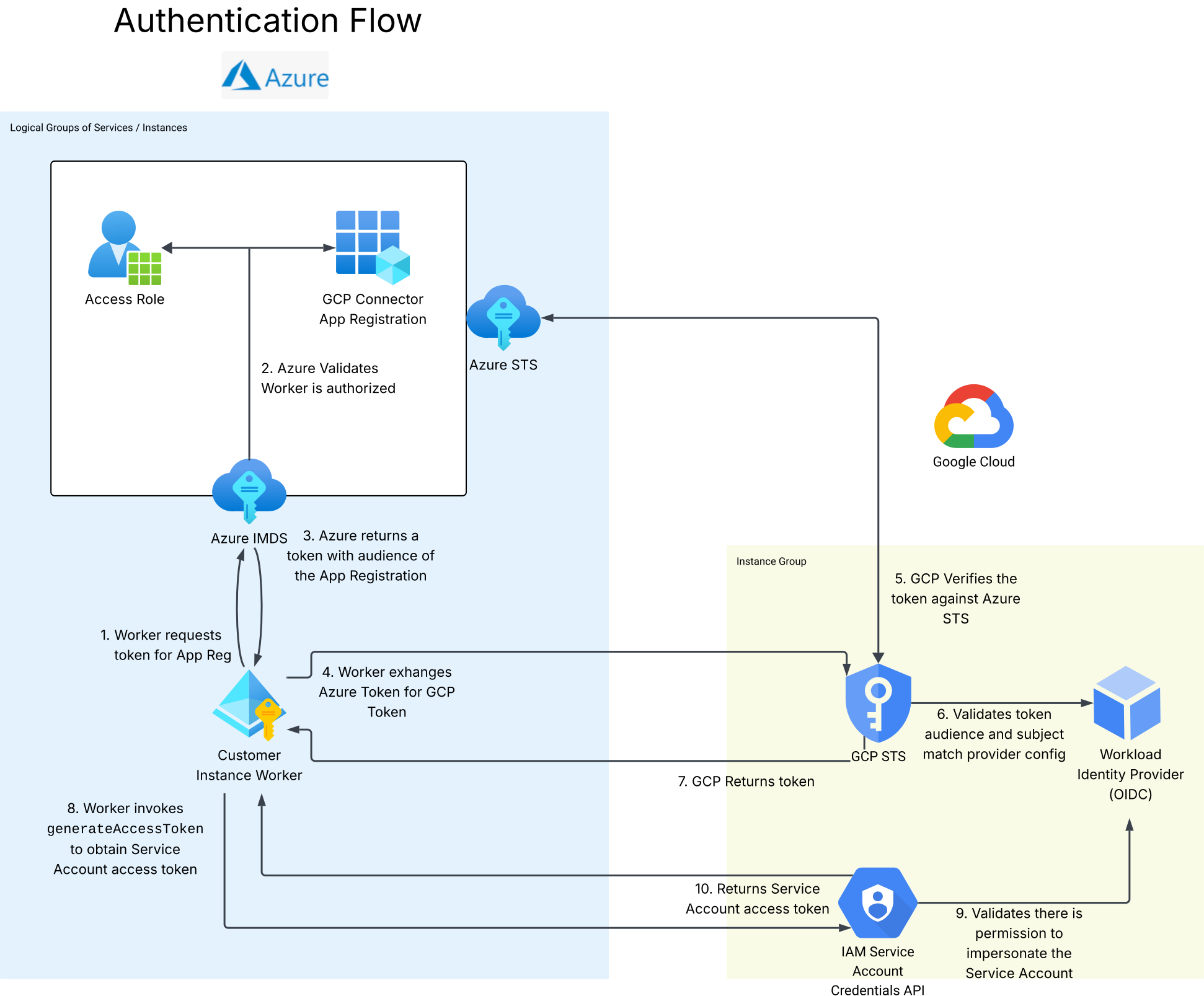
(From Lucidcharts under Products > CI Sync (EE) > GCP Authentication)
Overview
-
The CISynchronizer instance requests a token from the CI Sync Entra ID for the customer’s App Registration.
-
NB: Only the MSI running the customer’s workers is allowed to generate tokens for this App Registration.
-
An example of the authentication request sent to the CI Sync Entra ID instance follows:
-
http://169.254.169.254/metadata/identity/oauth2/token?api-version=2018-02-01&resource=api://<app-reg-guid>
-
-
-
The token returned from the CI Sync Entra ID instance is then exchanged for a GCP Token for the created Workload Identity provider
-
The Customer will have configured the GCP Workload Identity pool and provider to only accept tokens with the values provided by CI Sync:
-
Tokens with an audience of
api://<app-reg-guid> -
Tokens with the subject of
<msi-guid>
-
-
An example of the CI Sync request sent to GCP follows:
-
https://sts.googleapis.com/v1/token
JSON{ "grant_type": "urn:ietf:params:oauth:grant-type:token-exchange", "audience": "//iam.googleapis.com/projects/{{PROJECT_ID}}/locations/global/workloadIdentityPools/{{POOL_ID}}/providers/{{PROVIDER_ID}}", "scope": "<https://www.googleapis.com/auth/cloud-platform>", "requested_token_type": "urn:ietf:params:oauth:token-type:access_token", "subject_token_type": "urn:ietf:params:oauth:token-type:jwt", "subject_token": "{{step_1_azure_token}}" } -
-
-
CI Sync will then generate a short-lived access token for the Service Account in GCP
-
The Customer will have configured the Workload Identity Pool to only grant access to Service Accounts for the MSI running their CI Sync Instance
google.subject="<msi-guid>" -
An example of the impersonation request sent from CI Sync to GCP follows:
-
https://iamcredentials.googleapis.com/v1/projects/-/serviceAccounts/{{service_account_email}}:generateAccessToken
JSON{ "scope": [ "<https://www.googleapis.com/auth/cloud-platform>" ] } -
-
Related Articles
There are currently no related articles.
Control Information
|
Created |
|
|---|---|
|
Reviewed |
|
|
Data Classification |
PUBLIC
|