
Overall Process Flow
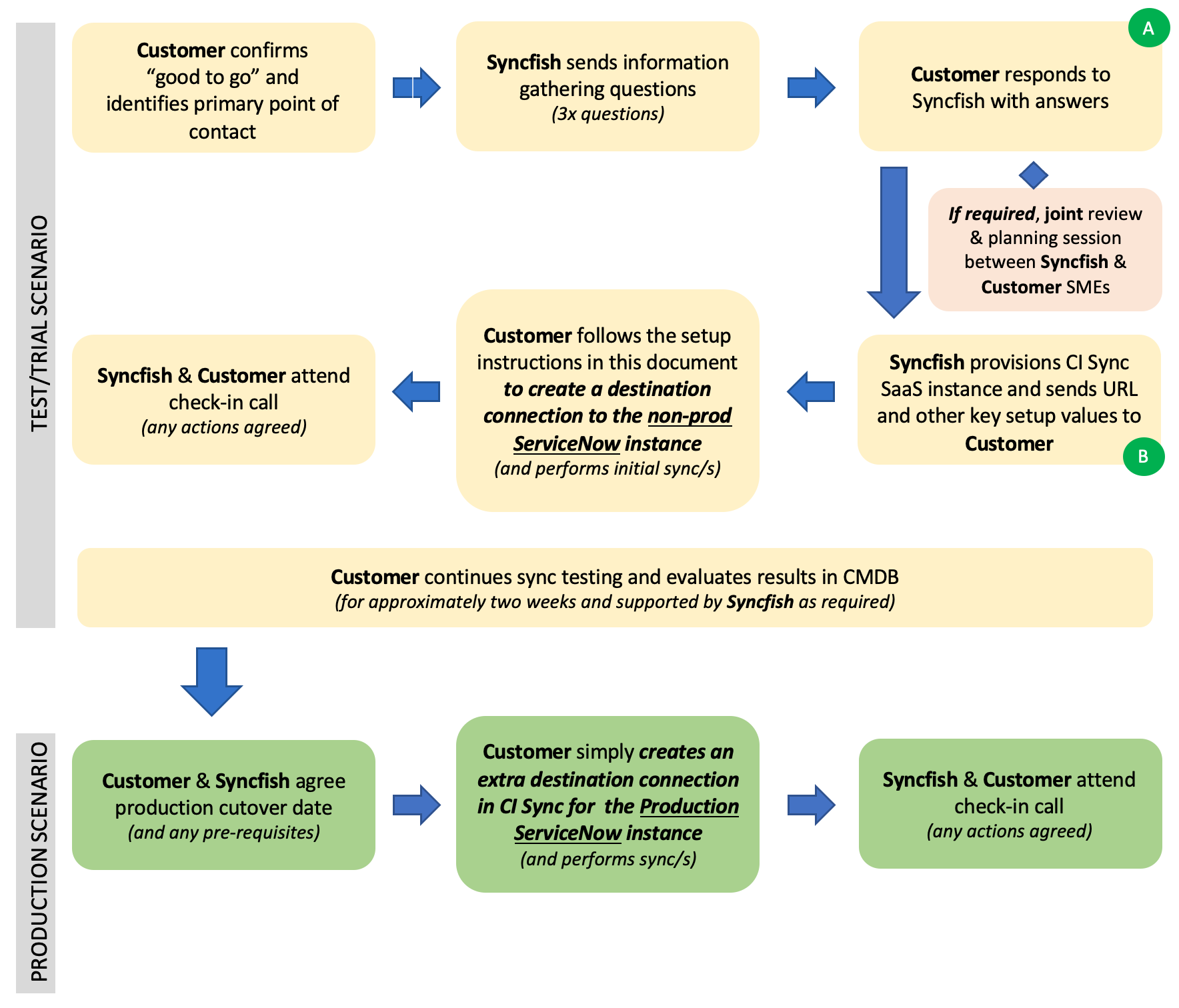
This diagram shows the overall process of implementing CI Sync into your environment after you have signed-up with Syncfish.
-
The above process can run in parallel with the ordering process.
-
The duration between A and B can be as short as 24 to 48 hours.
Overview of Non-Prod (Test) vs Production
For a new implementation (i.e. new Syncfish customer) Syncfish will provision the single instance of the CI Sync SaaS middleware.
These instructions are therefore suitable for setup of a single instance of CI Sync, and the associated components:
-
One Multi-Source Agent will provide connections to source systems for both TEST and PROD data
-
Two ServiceNow instances as the destination CMDBs (i.e. one destination connection in CI Sync for the TEST ServiceNow CMDB and a second destination connection in CI Sync for the PROD ServiceNow CMDB).
For initial testing (or for a trial) we anticipate our customers will setup source and destination connections in their CI Sync instance as follows:
-
A source connection in CI Sync to their production/live source system.
-
A destination connection in CI Sync to either their DEV or TEST ServiceNow instance.
The above configuration would normally be in place for approximately two-weeks to ensure the source asset data is being successfull synchronized to the TEST ServiceNow CMDB.
During the test period Syncfish will assist with diagnosis or troubleshooting and will discuss any proposed variations to the default correlation, mapping and transform rules within the CI Sync SaaS engine.
Once testing is complete, customers can setup a second destination connection in CI Sync to their PROD ServiceNow instance and continue CI Sync to read from the same source connections. Customers then simply start running synchronization jobs from the same source systems but now into their PROD ServiceNow.
How to Get Help from Syncfish
Knowledge Base
Please visit the Syncfish Knowledge Base here for trouble shooting articles covering typical errors (during setup or ongoing use of CI Sync).
Other Support Options
-
Visit the Syncfish Support Portal Home page here and use the “Log a Ticket” link.
-
Email the Syncfish Support Mailbox.
-
Reach out to your Syncfish contact point.
Extended Implementation and Ongoing Support Plans
Syncfish offers Extended Implementation and Ongoing Support Plans for customers seeking in-person assistance, changes to the Advanced Data Sync Rules, implementation of Custom Data Sync Rules, and other forms of additional support.
Details of the Extended Implementation and Ongoing Support Plan are published on the Syncfish website here.